ELECTRONIC SEWING
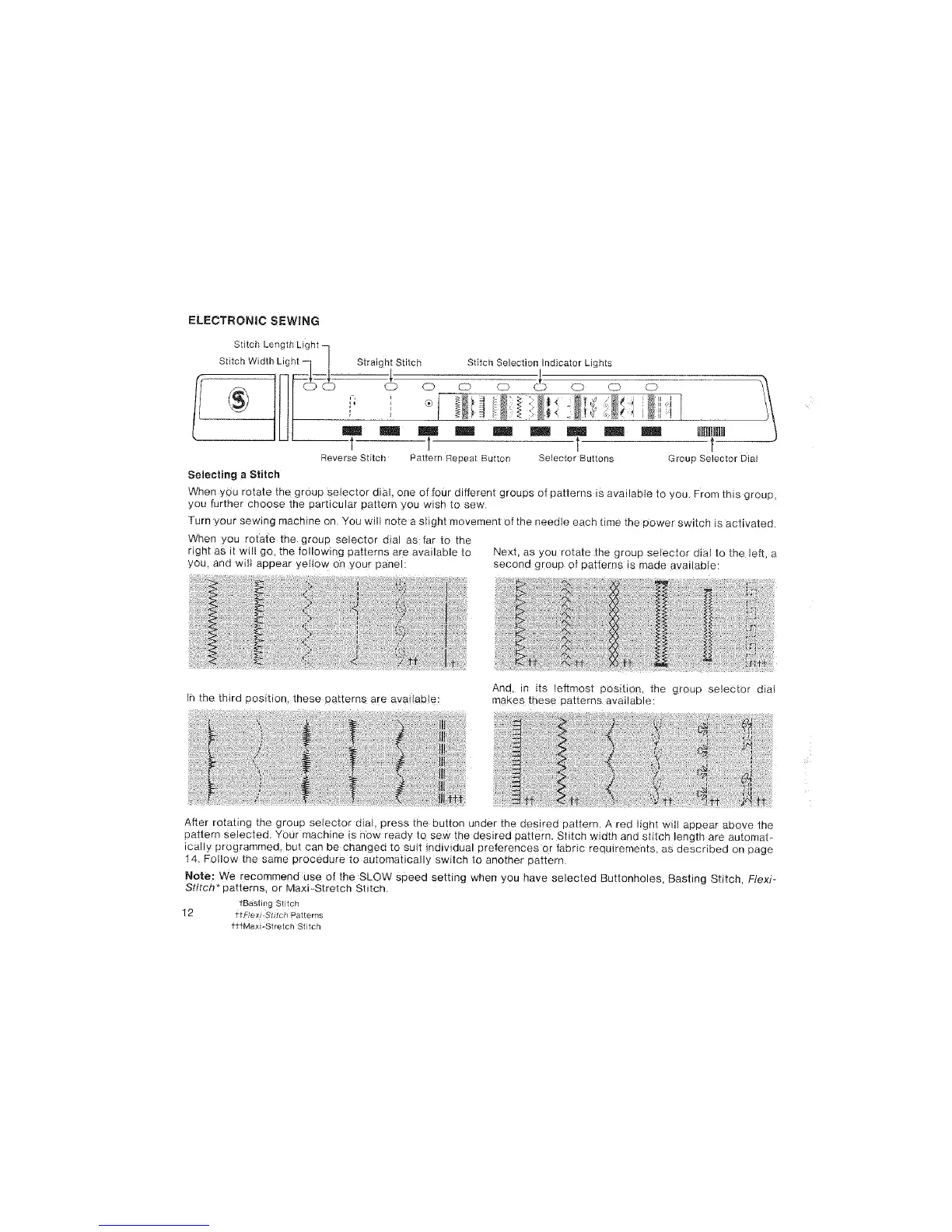
Stitch Length Light
ii___ iiC_StitchWidth Light -- Straightl: Stitch Stitch Selection_._lndicator_ Lights _
CD 0 CZ) 0 _.._D C_ tiED LC_
t 1 t
Reverse Stitch Pa_ternRepeat Button Selector Buttons Group Selector Dial
Selecting a Stitch
When you rotate the group selector dial, one of four different groups of patterns is avaiiabIe to you. From this group,
you further choose the particular pattern you wish to sew
Turn your sewing machine on. You will note a slight movement of the needle each time the power switch is activated.
When you rotate the group selector dial as far to the
right as it will go, the following patterns a_e available to Next, as you rotat_ the group selector dial to the le_, a
you. and wilt appear ye!!ow on your panel: second group of patterns is made available:
in the third position, these patterns are avai!aMe
And, in its /eftmost position, the group selector dial
makes these patterns available:
After rotating the group selector dial, press the button under the d_sired pattern. Ared light will appear above the
pattern selected. Your machine is now ready to sew the desired pattern. Stitch width and stdeh length are automat-
ically programmed, but can be changed to suit individual preferences or fabric requirements, as described on page
14. Follow the same procedure to automatically switch to another pattern.
Note: We recommend use of the SLOW speed setting when you have selected Buttonholes, Basting Stitch, Flexi-
Stitch* patterns, or Maxi_Stretch Stitch_
fBasting Stitch
12 t_Flexr_StLtch Patterns
fttMaxilStretch Stitch



 To Next Page