12 | Sinterit Lisa printer SHORTENED USER GUIDE
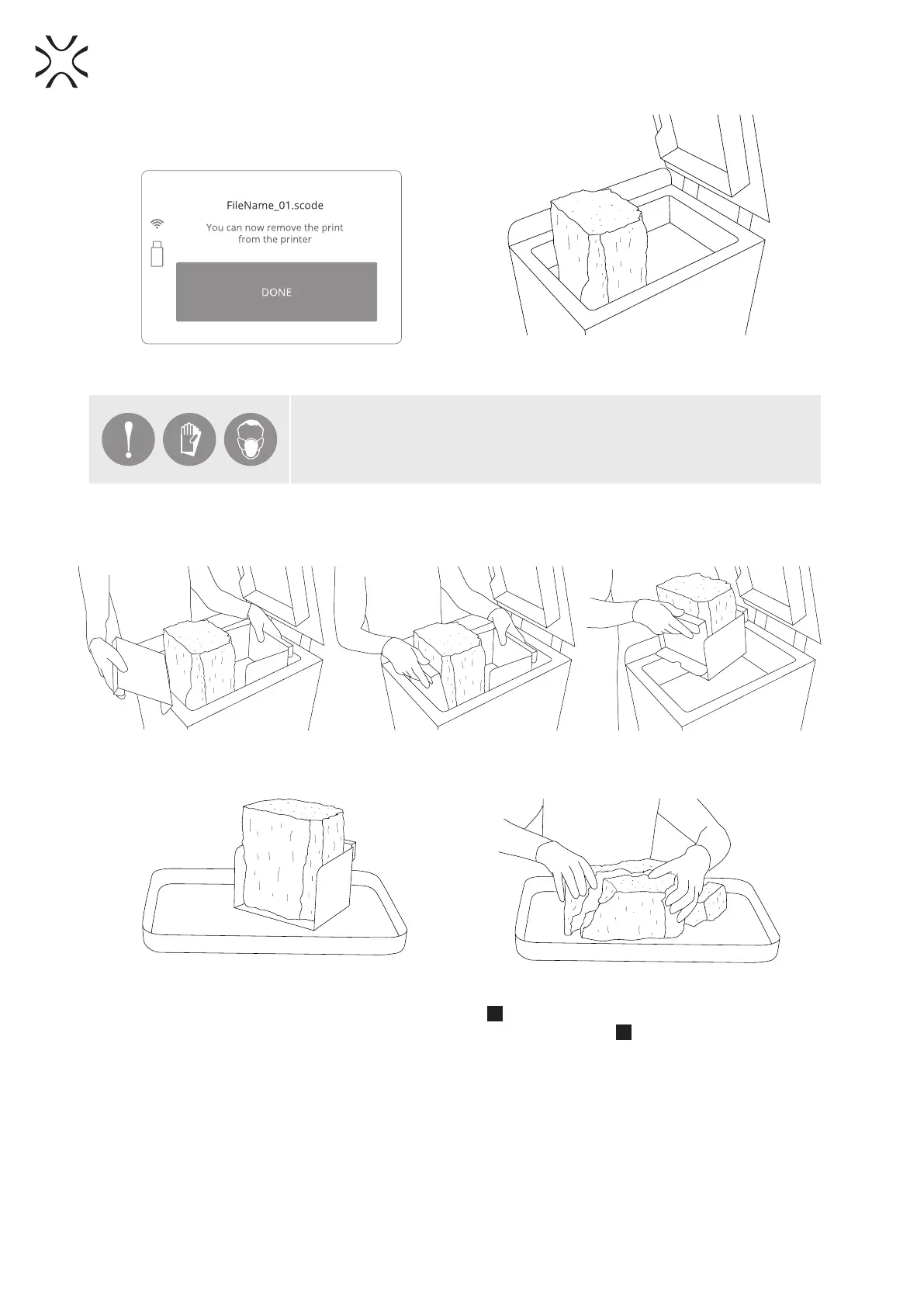
Image 35. Removing a printout screen 2. Image 36. Correct condition of the BEDs content
after printing (visible cracks on the surface).
IMPORTANT!
Put on the protective clothing included in the set (mask, glasses and gloves).
8. Remove the printout using two plates for carrying the printouts and carefully transfer it to the tray (Image 37).
All tools are included in the Box with additional accessories.
Images 37. The correct way of taking out printouts from the PRINT Bed.
9. Leave the content with the printouts to cool down, for at least one hour (Images 38).
Images 38. Cooling the printout.
10. Remove the unsintered powder from the OVERFLOW BIN
9
(Image 39).
a. Unlock the OVERFLOW BIN - lift and hold the OVERFLOW BIN locking bolt
30
.
b. Remove the OVERFLOW BIN with the contents at the same time.
11. Transfer unsintered powder to the container/tray in which it will be mixed, with the Fresh Powder – for PA
powder (Image 40).
12. Place the OVERFLOW BIN back in its place. Conrm with the “DONE” button (Image 39).



 To Next Page