4 | Sinterit Lisa printer SHORTENED USER GUIDE
17
16
19
1
18
19
21
22
20
30
31
1
23
16
27
29
28
25
26
24
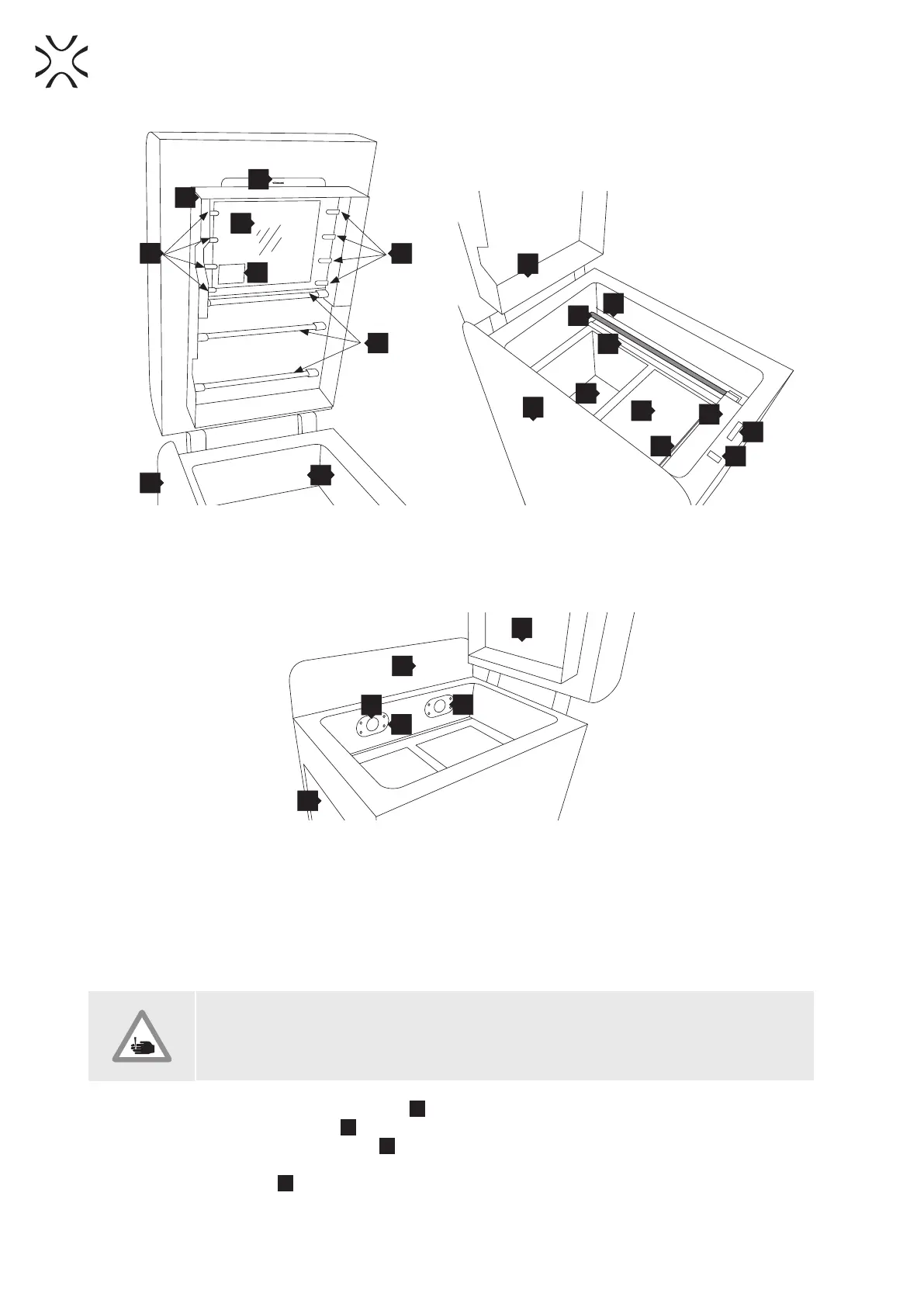
Image 3. View of the printer’s Heating module.
16.Heating module / 17.Split pin / 18.LASER PROTECTIVE
GLASS / 19.Short Infrared heaters (white) 4 pieces on
each side / 20.Laser system / 21.Long Infrared heaters
(red) 4 pcs. / 22.Print chamber
Image 4. View of the printer’s Print Chamber.
23.RECOATER drive unit cord / 24.RECOATER guide bar /
25.RECOATER cord (short) / 26.FEED Bed / 27.PRINT Bed /
28.OVERFLOW BIN gap / 29.RECOATER / 30.OVERFLOW BIN
bolt / 31.Lid electromagnetic lock
34
33
16
32
1
9
Image 5. Back view of the printer’s inner chamber (view of the pyrometers).
32.PRINT Bed pyrometer/ 33.FEED Bed pyrometer / 34.Embedded camera (captures image from the PRINT Bed)
2. Preparing the machine to print
A. INSTALLING / CLEANING THE LASER PROTECTIVE GLASS
CAUTION!
Beware of sharp edges. Put on the Protective Gloves in order to protect yourself from
injuring the hand against the edge of the Heating module.
1. Turn on the printer. Switch the Power Switch
15
from “0” to”1”.
2. Check the Emergency Stop Button
12
. Twist to unlock if needed.
3. Turn the printer on with the Ignition key
11
.
4. Wait until the main menu with four buttons appears on the LCD screen (it takes about 20 seconds).
5. To open the printer’s Lid
5
, press: “START NEW PRINT” // “UNLOCK LID” buttons on the LCD screen (Image 6).
The Lid’s electrolock deactivates for 10 seconds. After 10 seconds, it will re-activate.



 To Next Page