1
2
3 4 5 6
Reader Equipment Installation
INfinity 510 User’s Guide, P1.04
3
Reader Equipment Installation
Mechanical Installation
Mounting the Reader
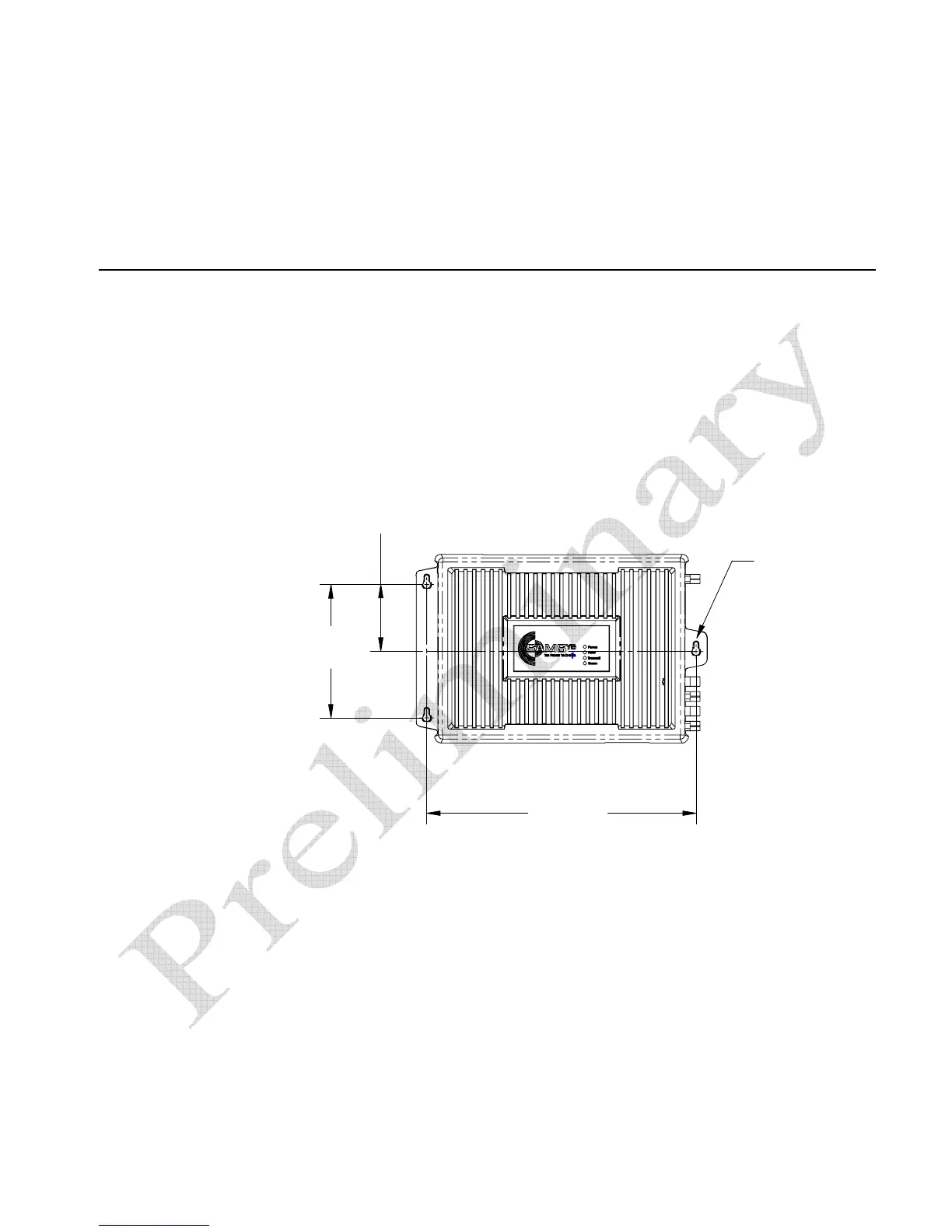
The INfinity 510 is equipped with two mounting flanges and slotted
keyholes that accept three #8 (M4) mounting screws. Predrill any mounting
surface according to the following dimensions. Any mounting surface must
be able to support up to four pounds (1.8 kg).
6 3/16"
(157.2 mm)
12 15/32"
(316 mm)
3 3/32"
(78.6 mm)
(3X) LOCATION
FOR #8 Screw (M4)
Concrete Wall Mounting
To mount the INfinity 510 to a hollow concrete block wall, Sirit recommends
metal sleeve type concrete anchors that accept #8 screws and flat washers.
Wood or Metal Wall Mounting
To mount the INfinity 510 to a wood or sheet metal wall, Sirit recommends
either #8 x 1 inch wood screws or #8 x 1 inch sheet metal screws and
washers.
Drywall Mounting
To mount the INfinity 510 to drywall or sheetrock, Sirit recommends either
#8 toggle bolts or #8 drywall anchors.


 To Next Page