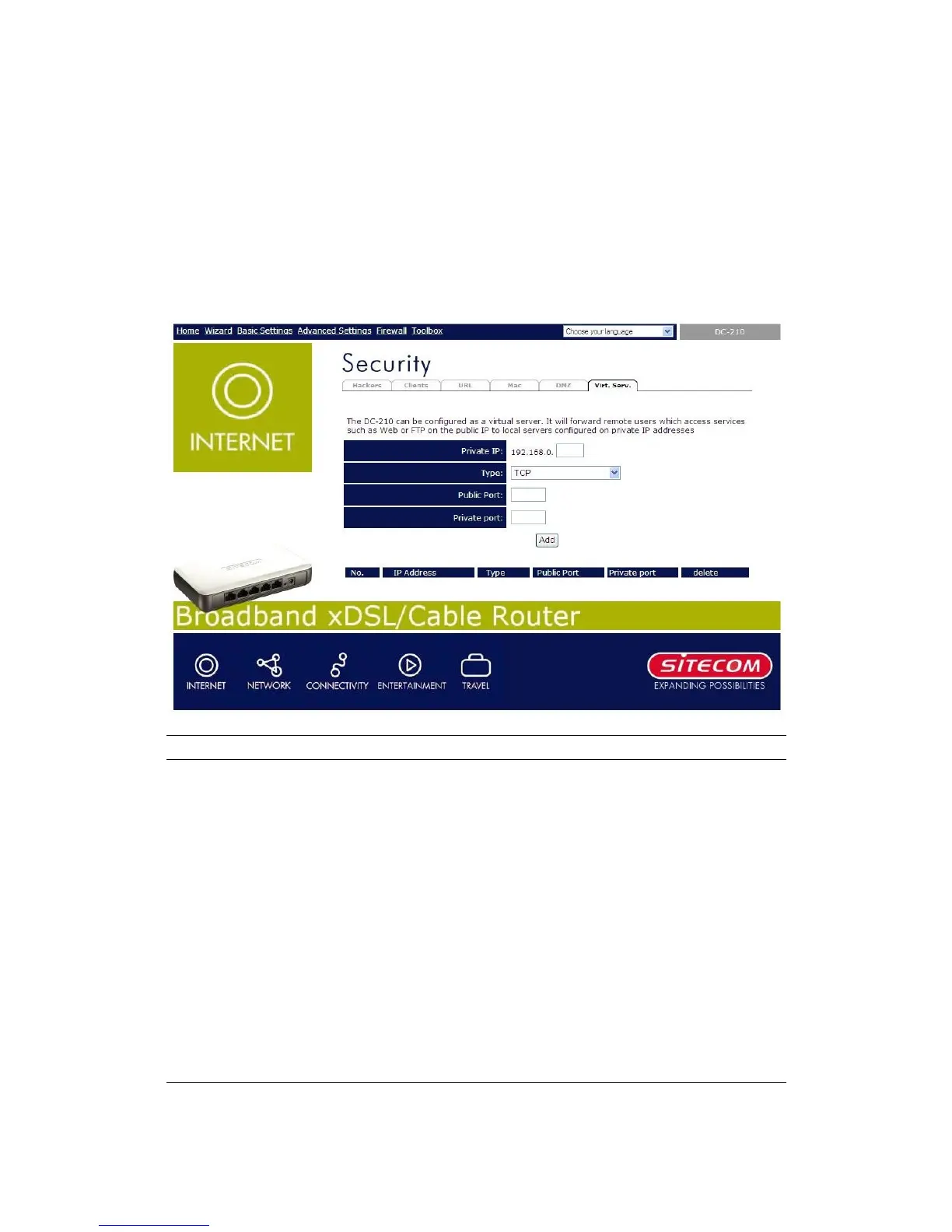
11.6 Virtual Server
Use the Virtual Server function when you want different servers/clients in your LAN
to handle different service/Internet application type (e.g. Email, FTP, Web server
etc.) from the Internet. Computers use numbers called port numbers to recognize a
particular service/Internet application type. The Virtual Server allows you to re-direct
a particular service port number (from the Internet/WAN Port) to a particular LAN
private IP address and its service port number.
Parameters Description
Private IP
This is the LAN client/host IP address that the Public
Port number packet will be sent to.
Note: You need to give your LAN PC clients a
fixed/static IP address for Virtual Server to work
properly.
Type
Select the port number protocol type (TCP or UDP).
Public Port
Enter the service (service/Internet application) port
number from the Internet that will be re-directed to the
above Private IP address host in your LAN
Note: Virtual Server function will have priority over the
DMZ function if there is a conflict between the Virtual
Server and the DMZ settings.


 To Next Page