9
Using Texturz
™
Texture Plates
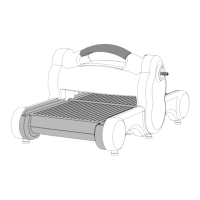
1. Place a Texture Plate on the Big Shot Pro Solo Platform and Solo Shim
(sold separately) with the desired design facing up. Place paper or desired
material on top of the Texture Plate. Place Silicone Rubber on top of paper.
Place Impressions Pad on top of Silicone Rubber to create a “sandwich”
(Figure H).
2. Place sandwich on top of the Adapter Pad in the Sliding Tray.
3. Follow Steps 3–5 in Operating Instructions, page 6.
Figure H
Silicone Rubber
Paper
Impressions Pad
"Sandwich"
Sliding Tray
Adapter Pad
Solo Platform
Solo Shim
Texture Plate
Using Textured Impressions
™
Pro Embossing Folders
1. Open embossing folder and insert paper, cardstock or other embossable
material, making sure that the edge of the paper rests against the small
edge-blocks inside the die. Close the folder.
2. Place the closed Textured Impressions Pro Embossing Folder on top of the Big
Shot™ProSoloPlatform(soldseparately).DONOTUSECUTTINGPADS
(Figure G). Place on top of the Adapter Pad in the Sliding Tray.
3. Follow Steps 3–5 in Operating Instructions, page 6.
Figure G
Textured Impressions Pro
Embossing Folder
Paper
Solo Platform
Textured Impressions Pro
Embossing Folder



 To Next Page