AIRCRAFT FUNCTION PROFILE
20
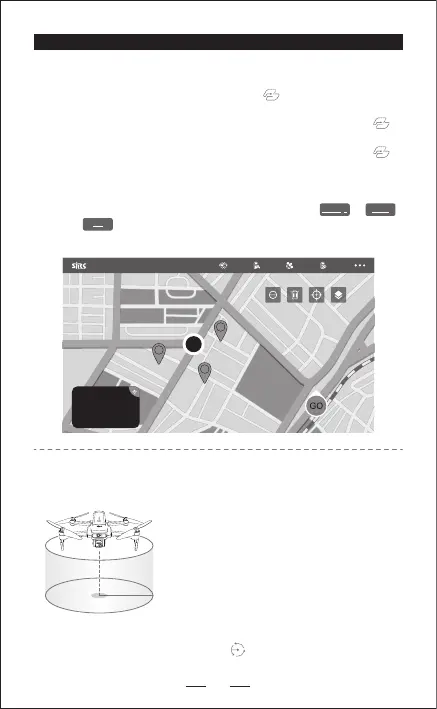
2. POINT OF INTEREST
Delete single
Send
Delete all
— Ensure the mobile internet connected, enter in the APP, catch the map
data of the area when you intend to fly in your mobile device, then connect
your mobile device with your aircraft, you can view the map from in
the APP.
— Successfully connect the aircraft WIFI with your smart phone, click on
the App, then you can find a RED CIRCLE(LIMITTED FLIGHT RANGE)/TAKE-
OFF POSITION/AIRCRAFT CURRENT POSITION on the map, mark the points
(16 points at most) you plan to fly within the RED CIRCLE range on the map.
If you would like to reset the points or flight route, click or .
Click ,confirm to start Way Point Flight. Pushing the Right Joystick
to cancel the Way Point Flight Function.
E
E
E
1. WAY POINT FLIGHT
1. Hover the aircraft at the center point to be
surrounded.
2. Select the surrounding radius on the APP, and
slide to flight.
3. When circling, you can control the left or right
direction lever to change the clockwise flight
or counterclockwise flight of the aircraft.
4. When circling, you can control the forward
direction lever or the backward direction lever
to change the circling radius of the aircraft.
5. Click the icon again on the APP to exit the
Surround Function.


 To Next Page