Time-
lapse
Photo
Video
Panorama
GPS
follow
Far fly
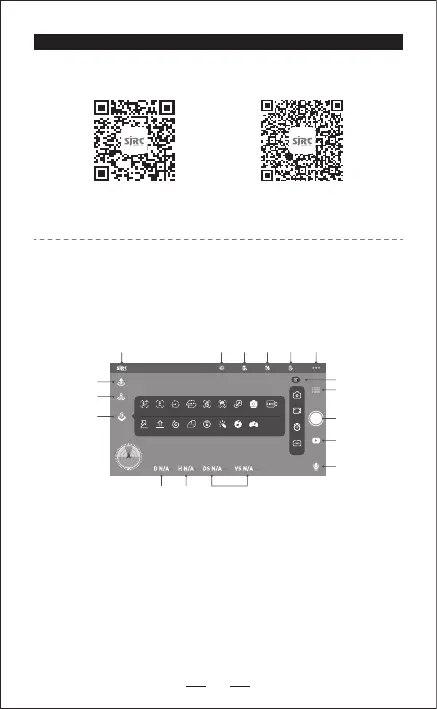
Sky fly Spiral fly VRT SC Filter Music VR
Obs-
avoidance
Image
follow
Interest
point
Route rules Ges photo Ges record Zoom Lens angle Live
SJ F PRO APP
15
1. Back to Main Menu 7. Auto Take-off 13. Media Gallery
2. Compass interference 8. GPS Return Home 14. Sound Recording
3. Remote Battery 9. More Functions 15. Distance (meters)
4. GPS Signal 10. SD card status 16. Height (meters)
5. Aircraft Battery 11. Shooting Function 17. Speed (meters/sec)
6. Setting 12. Shutter
QR code of “SJ F PRO”
software for Apple IOS system
QR code of “SJ F PRO”
software for Android system
1. DOWNLOAD THE SJ GPS PRO APP
2. APP INTRODUCTION
Wait until the aircraft Status says “Ready to Fly” before initiating flight.
This will ensure that your GPS is synced and your aircraft is ready to fly.
1 2 3 4 5 6
7
8
9
11
10
12
13
14
15 16 17


 To Next Page