14 EN
Options to activate laser
A) short press: < 0,5 sec:
click on /click off
B) press longer than 0,5 sec:
> laser is activated as long as
button is pressed;
laser is turned off after release
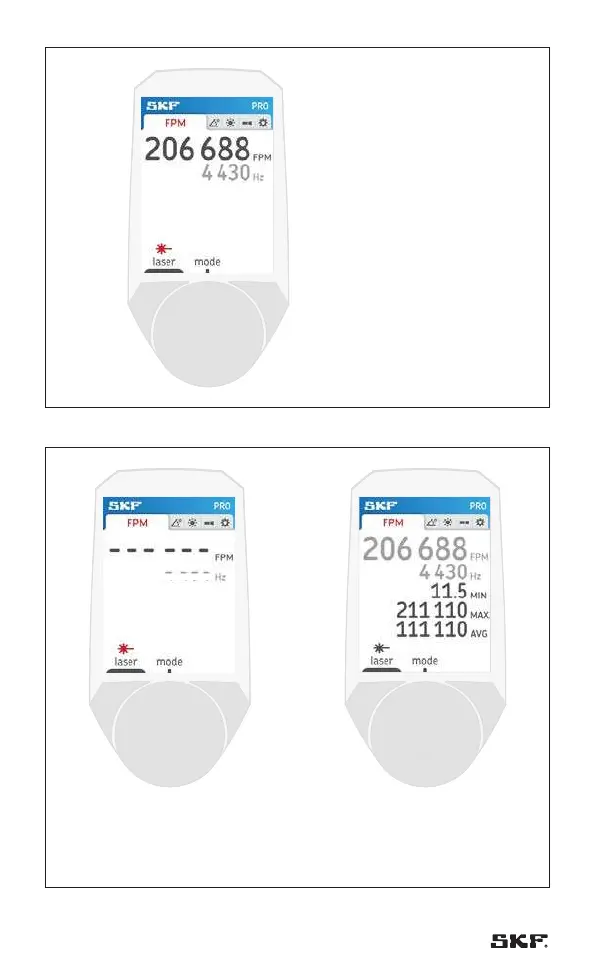
When laser is activated.
The symbols turn to red and the
rpm value is overruled by the laser.
Fig. 6 – Laser activated
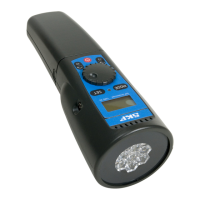
When laser is activated. The symbols
turn to red and the rpm value is
overruled by the laser. In case no
signal is detected “---” is shown.
By pressing the soft button again,
you stop the laser.
The display shows the min/max/avg.
Fig. 7 – No signal Fig. 7 – Laser stopped



 To Next Page