13
Skydio Enterprise Controller - Operator Manual © 2021 Skydio, Inc. All rights reserved.
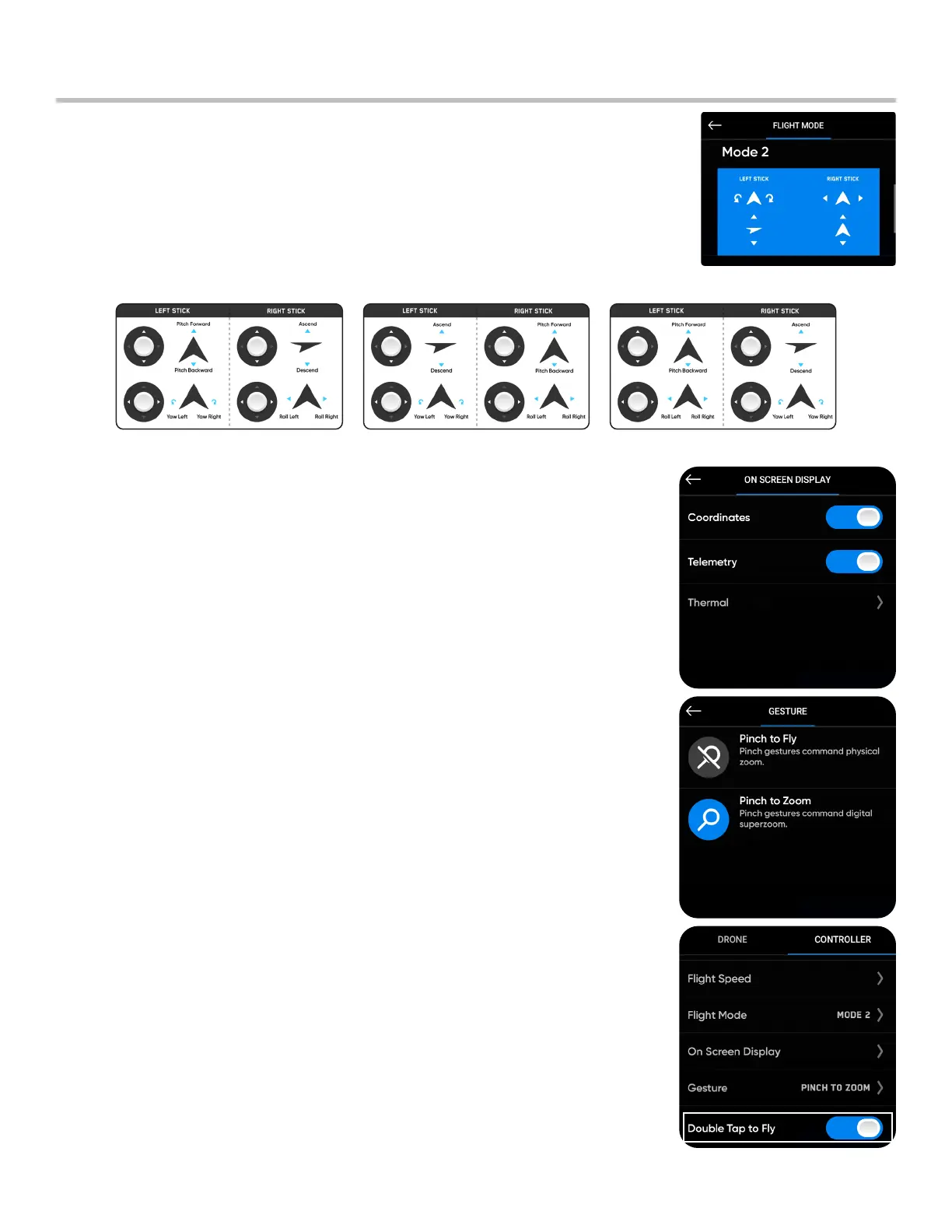
On Screen Display: toggle the information you want displayed while
flying on or o
• Coordinates - GPS location
• Telemetry - speed, heigh above launch point, range from launch
point and gimbal pitch (camera angle) are displayed while in flight
• Thermal - toggle picture-in-picture (PiP) and select the thermal
palette (Skydio X2 Color-Thermal only)
Mode 1 Mode 2 Mode 3
Gesture: opens sub menu to toggle Pinch to Fly and Pinch to Zoom on
or o
Double Tap to Fly: toggle double tap to fly on or o
Controller Settings
Flight Mode: determines how your Controller joysticks will maneuver
your drone. You may switch between Mode 1, 2 (default), and 3 style.


 To Next Page