6
Skydio Enterprise Controller - Operator Manual © 2021 Skydio, Inc. All rights reserved.
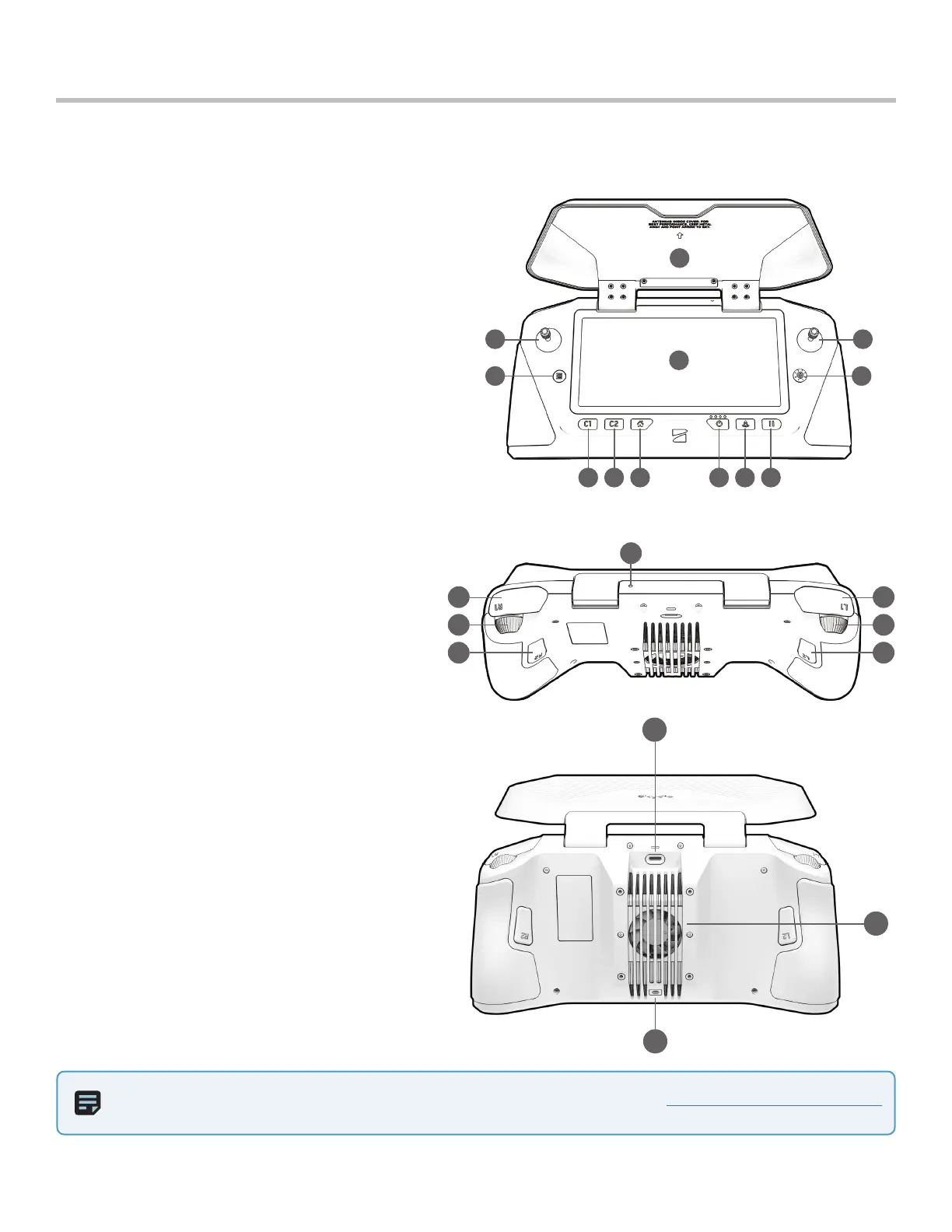
Skydio Enterprise Controller Overview
13 14
15 16
17 18
19
20
21
22
5 86 97 10
1
3
2
4
11
12
Hardware
NOTE: There are slight control variations when flying Skydio 3D Scan. Please read the Skydio 3D Scan Software Manual.
20. USB-C port
21. Cooling fan
22. Neck strap/tripod (¼-20 mount)
1. Left joystick - height and rotation (Mode 2, default)
2. Right joystick - lateral movement (Mode 2, default)
3. Back / Menu - navigate to previous screen
4. Directional pad - reserved for future update
5. C1 button - toggle Obstacle Avoidance
6. C2 button - toggle lights
7. RTH button - Return to Home
8. Power button
9. Launch / Land button
10. Pause button - pause an autonomous action
11. Controller clamshell - embedded antennas
12. User interface screen
13. R1 button - shutter / record
14. L1 button - boost, temporarily fly at max speed
15. Right wheel - zoom
16. Left wheel - gimbal tilt
17. R2 button - toggle map view
18. L2 button - toggle camera view
19. Reset button


 To Next Page