18
Skydio Enterprise Controller - Operator Manual © 2021 Skydio, Inc. All rights reserved.
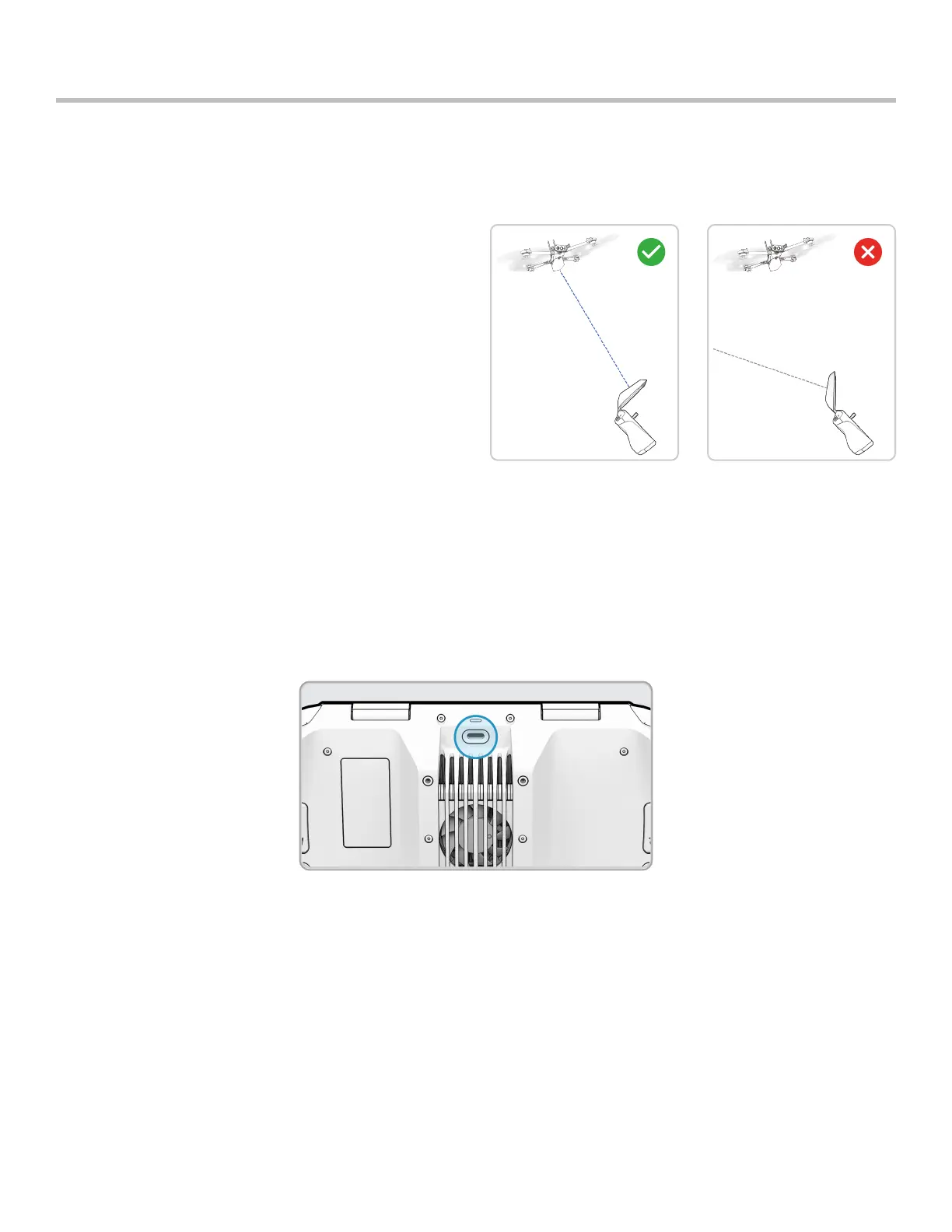
For best signal quality, always maintain a direct line of sight between the controller and Skydio X2.
When flying at close range high altitude, point the
controller cover toward the drone for maximum wireless
performance.
When flying at max range, point the controller cover
toward the drone while also keeping the controller as far
away from your body as possible. Bringing the controller
too close to your body will impact wireless performance.
Signal strength and maximum control range may be
aected when flying in areas with electromagnetic
interference.
Best Practices
Signal Quality
HDMI Output
You have the ability to display your Controller screen to an external HD monitor that has an HDMI port.
1. Power on your Enterprise Controller.
2. Connect the Controller to a third-party USB-C to HDMI cable.
3. Connect the HDMI end of the cable into the monitor.
4. Your Controller screen will automatically display on the monitor.


 To Next Page