216380ACA SJ3215, SJ3219, SJ3220, SJ3226, SJ4726, SJ4732, SJ4740
42
Section 4 – Inspections Before Operation
Function Tests
4.3 Function Tests
Do the function tests in sequence.
WARNING
Do not operate a MEWP that does not function
correctly. Lock and tag the MEWP, and remove it
for servicing. Only a qualified service technician
must repair the MEWP. If you do not obey, there is
a risk of death or serious injury.
Be sure to read Section 5 before you do the function
tests.
4.3-1 Do a test of the main power
disconnect switch
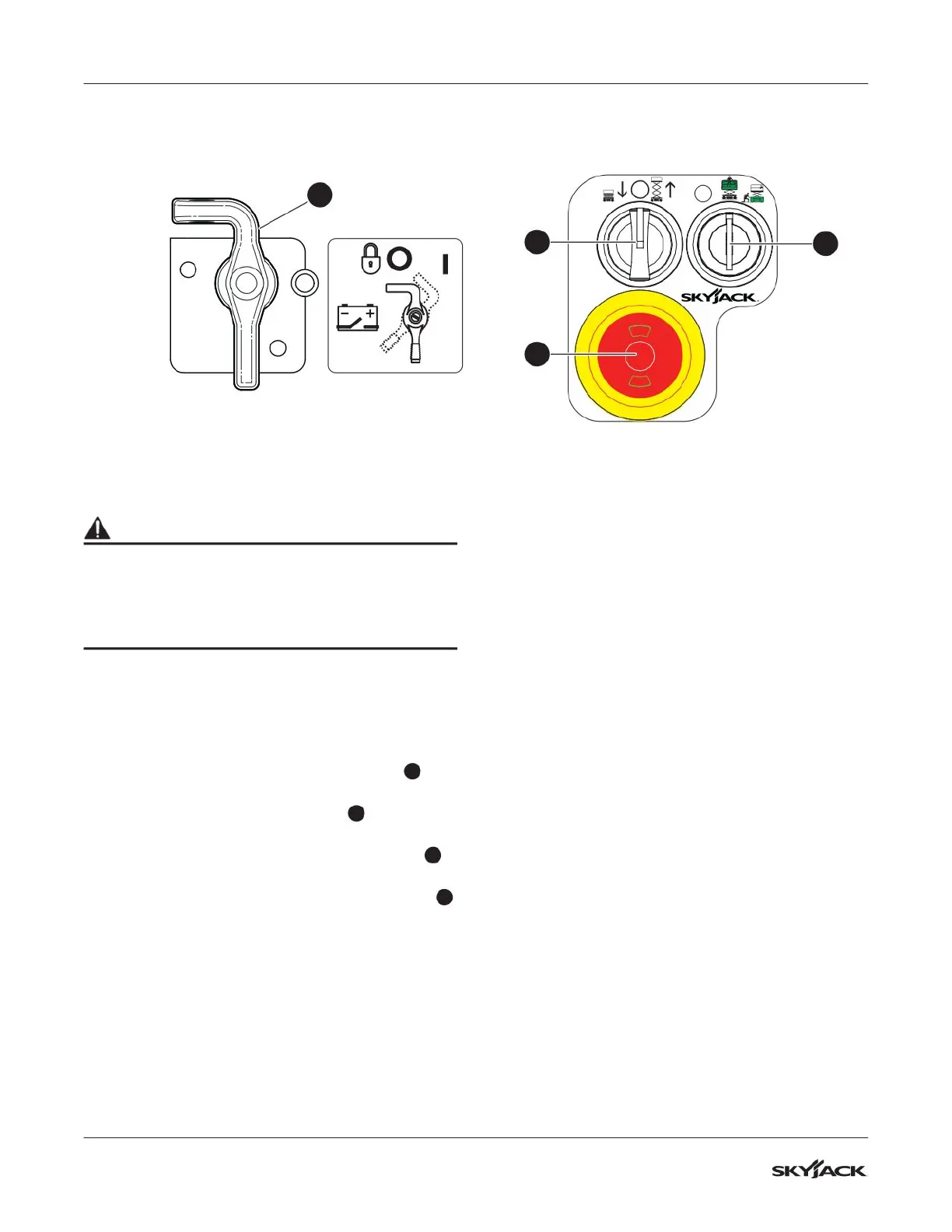
1. Turn the main power disconnect switch
1
to
the off position.
2. Pull the emergency-stop button
2
on the base
control console.
3. Turn and hold the off/platform/base switch
4
to the base position.
4. Turn and hold the lower/neutral/raise switch
3
to the raise position.
▪
Result: The platform does not rise.
4.3-2 Do a test of the control module and
load sensing module self-check
1. Push the emergency-stop button on the base
control console.
2. Turn the main power disconnect switch to the
on position.
3. Pull the emergency-stop button on the base
control console.
▪
Result: The beeper makes a sound for
approximately 1 second. The light on the
emergency-stop button comes on. This shows
that the system is in operation, and there are
no faults.
4. Make sure there are no error codes on the
Skycoded™ display panel.
▪
Result: If you see an error code, lock and tag
the MEWP. Remove the MEWP for servicing.
Speak to a qualified service technician for
repairs.
4.3-3 Do a test of the emergency-stop
button on the base
1. Turn the main power disconnect switch to the
on position.
2. Push the emergency-stop button.
3. Turn and hold the off/platform/base switch to
the base position.
4. Turn and hold the lower/neutral/raise switch to
the raise position.
▪
Result: The platform does not rise.
Base control consoleMain power disconnect switch
3
1
2
4



 To Next Page