SJ3215, SJ3219, SJ3220, SJ3226, SJ4726, SJ4732, SJ4740 216380ACA
65
Charge the Battery Section 6 – Procedures
NOTE
For the weight of the MEWP, refer to
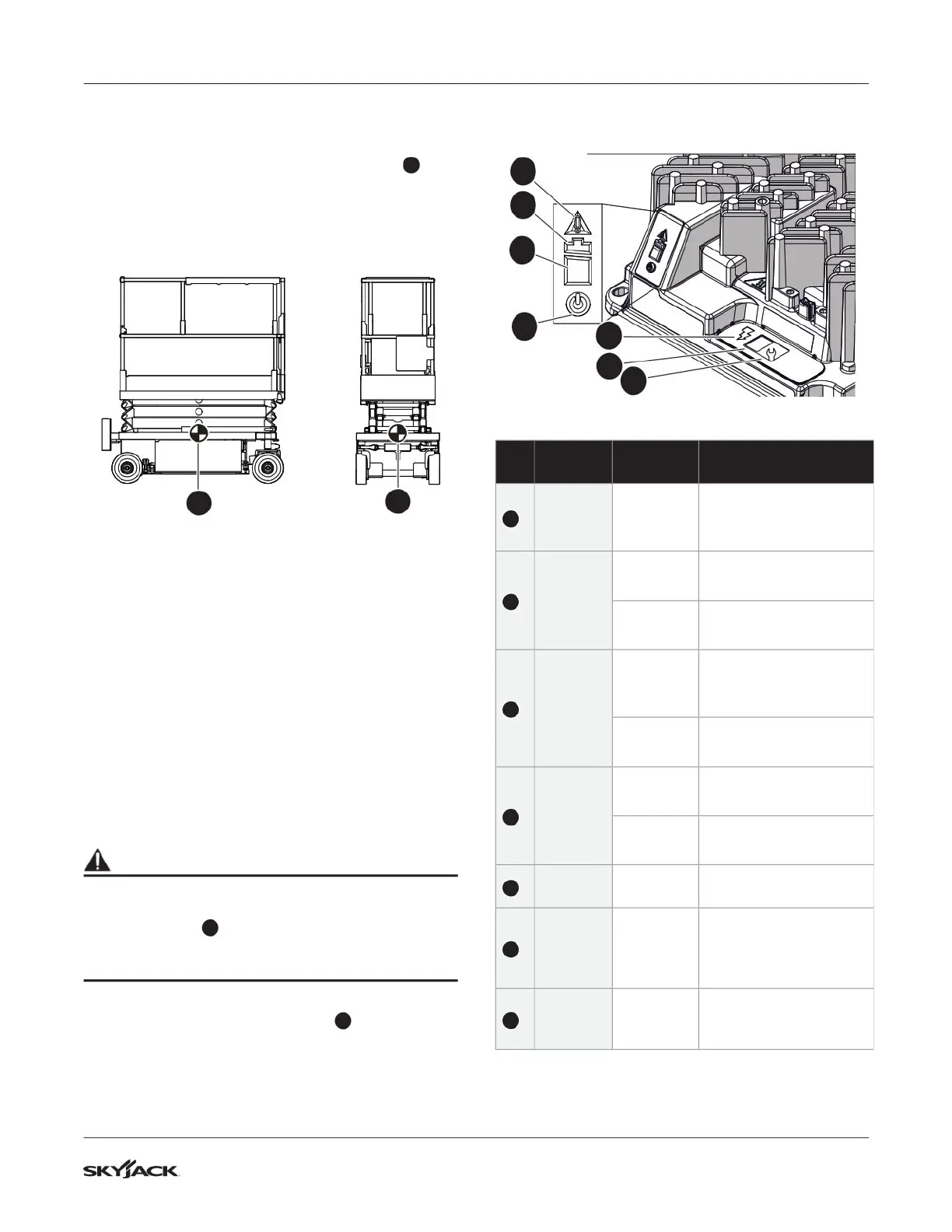
Section 7.3. Horizontally, the center of gravity
3
is approximately in the middle of the MEWP, front to
back and side to side. Refer to Figure 18. Vertically,
the center of gravity is approximately a small distance
above the chassis.
3
3
Figure 18 Center of gravity
6.6-2 Drive and tie-down the MEWP
Before you drive the MEWP:
▪
The ramp or dock capacity must be able to hold
the maximum MEWP weight.
▪
Use side guards (if available) to prevent a fall
from the ramp.
▪
The incline of the ramp must not exceed the
MEWP gradeability. Refer to Section 7.3.
▪
Do a test of the MEWP brakes to make sure they
operate correctly.
▪
Move the inclined-drive/level-drive switch to the
inclined-drive (low speed/high torque) position.
WARNING
When you transport the MEWP, it must be attached
to a truck or trailer deck. Use the available
tie-down points
1
to attach the MEWP. Refer to
Figure 15. If you do not obey, there is a risk of
death or serious injury.
▪
Tie-down the MEWP to the transport vehicle
using the four tie-down points
1
. Refer to
Figure 15.
6.7 Charge the Battery
1
2b
3
2a
4
5
6
No.
Indicator
type
Condition Description
1
AC
power
Blue
Battery charger is
connected to the AC
power.
2a
Battery
charge
<80%
Green
flash
Low charge— continue
to charge.
Solid
green
High charge—
continue to charge.
2b
Battery
charge
>80%
Green
flash
High charge—
continue to charge or
stop the charge.
Solid
green
Charge complete—
stop the charge.
3
Fault/
error
Solid red
Charger fault—refer to
the service manual.
Amber
flash
Error found—refer to
the service manual.
4
Charge
output
Solid
yellow
Charger output is on.
5
Charge
profile/
error
display
Algorithm
or fault/
error code
N/A.
6
Select
charge
profile
Charge
algorithm
N/A.



 To Next Page