SET WATER GENERATION PERIODS, TEMPERATURES AND
QUIET MODE
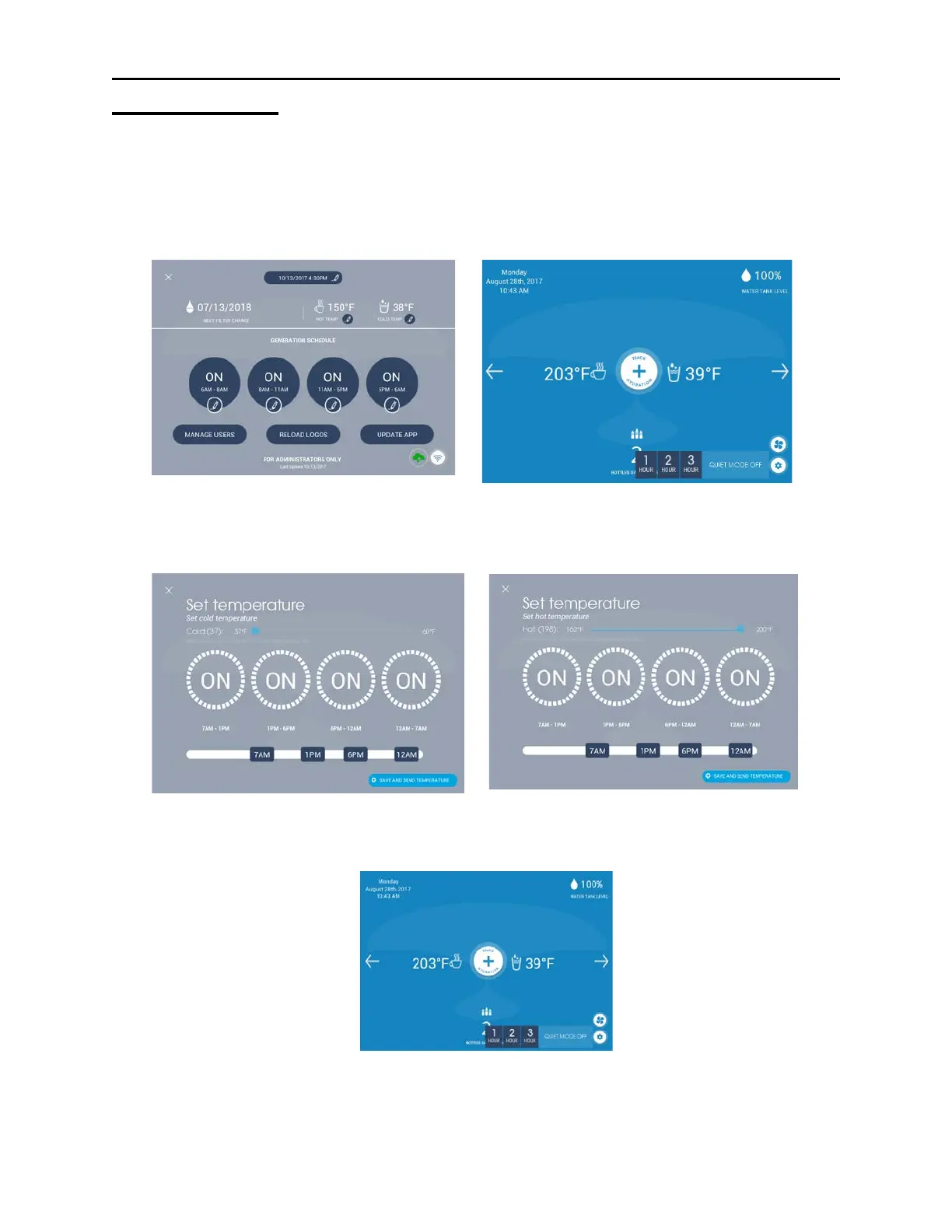
Daily Water Generation Schedule – Tap the Settings icon on the bottom right hand
corner of the dashboard. Enter the Administrator PIN (1111). Tap the 4 buttons
and use the slide bar to set a generation schedule. You can set up to 4 different
time periods. Setting all four time periods to “ON” will produce the most water.
Highest sound levels occur during water generation.
Hot and Cold Water Temperature Settings/Scheduling – Tap the pencil icon next
to Hot Temp or Cold Temp and use the scroll bar to change the water
temperature. Tap "Save and Send Temperature" to save changes.
Quiet Mode - Tap the fan icon on the bottom right hand corner of the home
page. Select Quiet Mode for 1, 2, or 3 hours. The fan will automatically restart at
the end of the selected time period. Water generation will not occur in Quiet
Mode.
This feature is especially useful when the Skywell is placed in a meeting room.
Quiet Mode can be implemented usually for the duration of the meeting.


 To Next Page