-18-
MENU CONTROL
3D Settings
when you connect VGA cable to the jacks of PC and
select the signal source as "PC" the screen menu will
be activated. You can use the function to adjust the
display setting automatically or manual.
Auto Adjust
Press " " button to auto adjust PC size and position.
H. Position
Press " " button to adjust the H-Position of the
television.
V. Position
Press " " button to adjust the V-Position of the
television.
Phase
Press " " button to adjust the phase of the picture.
Frequency
Press " " button to adjust the updating frequency
of the picture.
PC
Auto Adjust
H. Position
V. Position
Phase
Frequency
50
50
50
50
PC Settings
Note: These settings are only available in PC mode.
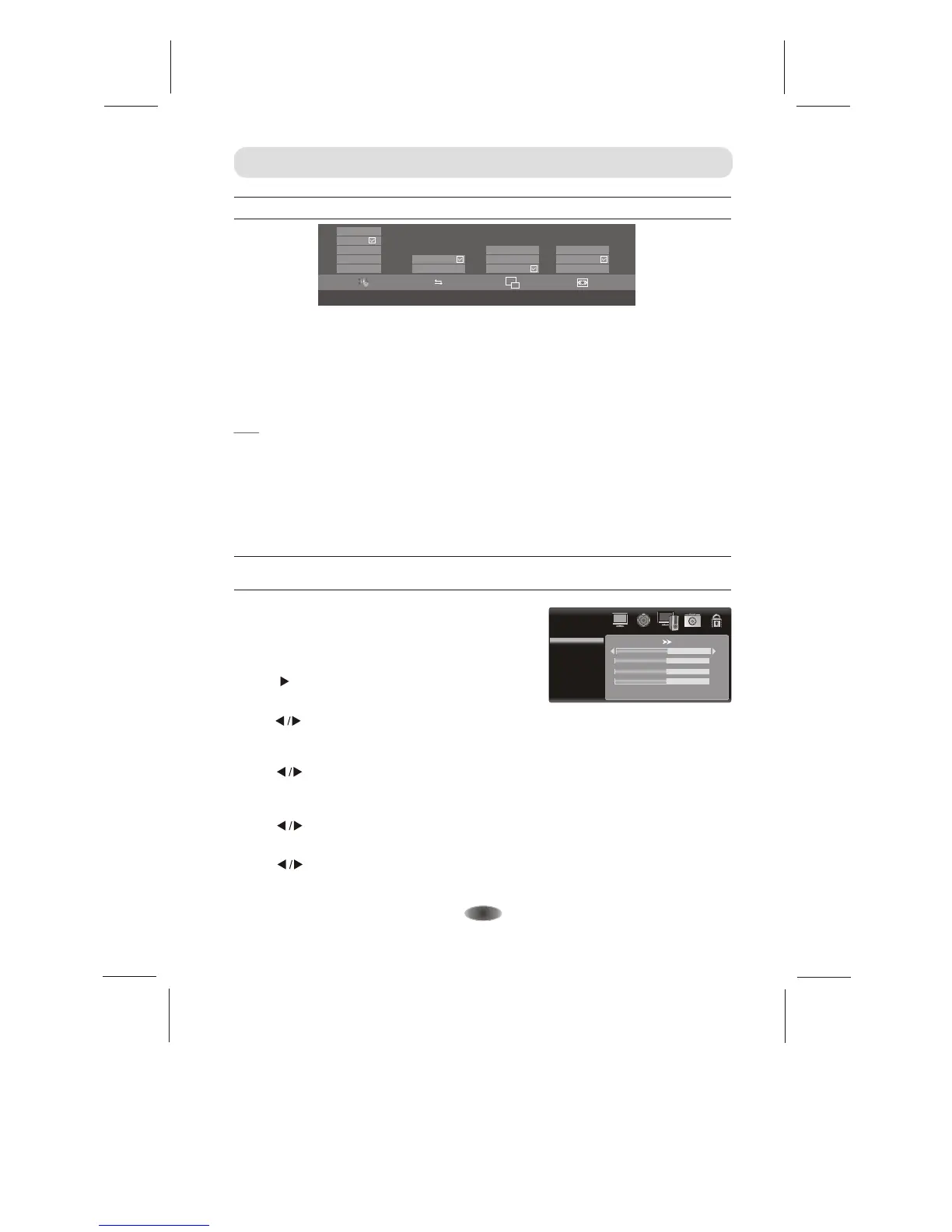
3D FORMAT LEFT/RIGHT
3D TO 2D
DEPTH
Top bottom
Frame sequence
Middle
Weak
Strong
3D
2D
Off
On
Left
Off
Right
Left right
Off
2D TO 3D
3D FORMAT 5 Modes: 2D TO 3D, Off, Left right, Top bottom, Frame sequence.
LEFT/RIGHT Select "On" to swap Left & Right if the source video.
3D TO 2D In 3D mode, select the "Left" or "Right", the system automatically switches to 2D
mode image, select the "Off", switches to 3D mode image
DEPTH In 3D mode, choose "2D TO 3D", this option can only be used.
Note:
1.When you play video in , advice you to use the video player which
is an Built-in android system.
2.There are only functions of "2D TO 3D" and "DEPTH" in
3.When you change the source
it will close the 3D function by itself.
4.It will automatically identify the 3D information and open the 3D function in HDMI mode.
There will be only functions of "2D TO 3D" and "DEPTH" ,if it can't identify some 3D information in HDMI.
5.Sources for doing non-3D 3D processing, image may appear abnormal, by setting the 3D mode to "Off ",
you can return to normal.
android system
application
TV mode and AV mode..
or push out the control menu in video player applicaiton built-in android system
when you play video


 To Next Page