EasyManua.ls Logo

Skyworth 42E68 - Has audio but no video

Skyworth 42E68
91 pages
Print Icon
To Next Page IconTo Next Page
To Previous Page IconTo Previous Page
Loading...
Y
Y
Y
Y
Y
OK
OK
OK
OK
OK
OK
N
N
N
N
N
N
N
N
N
N
N
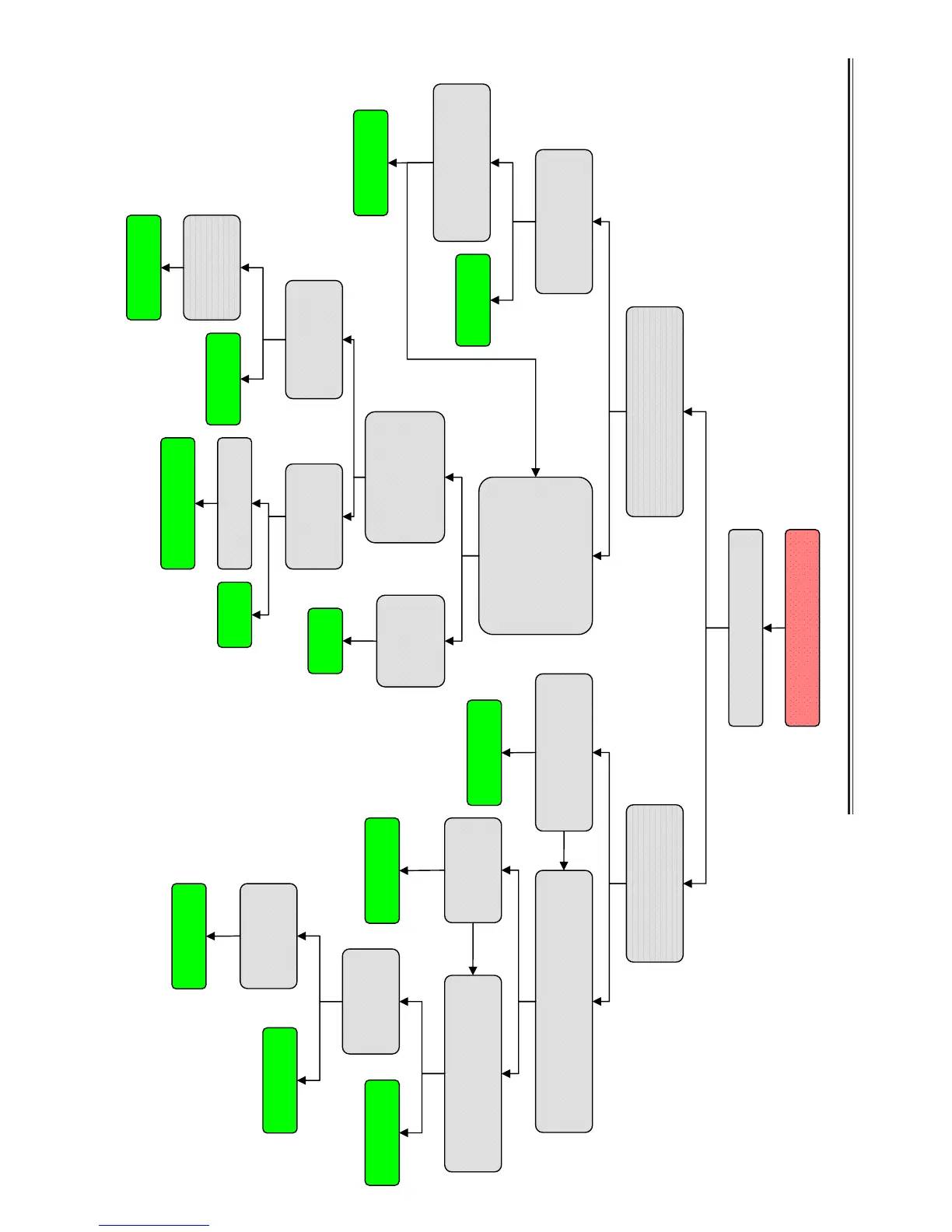
Has audio but no video
Check if the backlight is on
Done
Check the connector of
b
ackli
g
ht inve
r
ter connected
Check the LVDS line
if it is connected
Safely connect the
inverter line
Check the voltage of
inverter line is 24V
Done
Y
Y
Y
N
N
N
Check the
“ON/OFF” voltage
on “CN2 ”, should
be greater than 2.7V
Check “Q28 &
“U101” PinB10
&B12
if it works well.
Change
the panel.
Done
Upgrade the
software
Change the
Q
3” or “U11”
Change the“U101
Done
Done
Done
Upgrade the
software
Done
Safely connect the
LVDS line
Make sure the LVDS power is correct
(5V for 24”, 12V for 32)
Done
Change the Flash U100
Done
Correct the
p
owe
r
Chane the
main IC U101
Done
Change the
main
b
oard
Done
Done
Service Flow Chart
-51 -

Related product manuals