-8-
© September 2011 Smart Openers Pty Ltd
Setting Door Type
The Smart Lifter ECO has a specic program for one-piece
(J-Type) tilt doors. In this mode the door moves slower to
accommodate the shorter range of travel and wave action
on a tilt door. Default = Sectional Mode
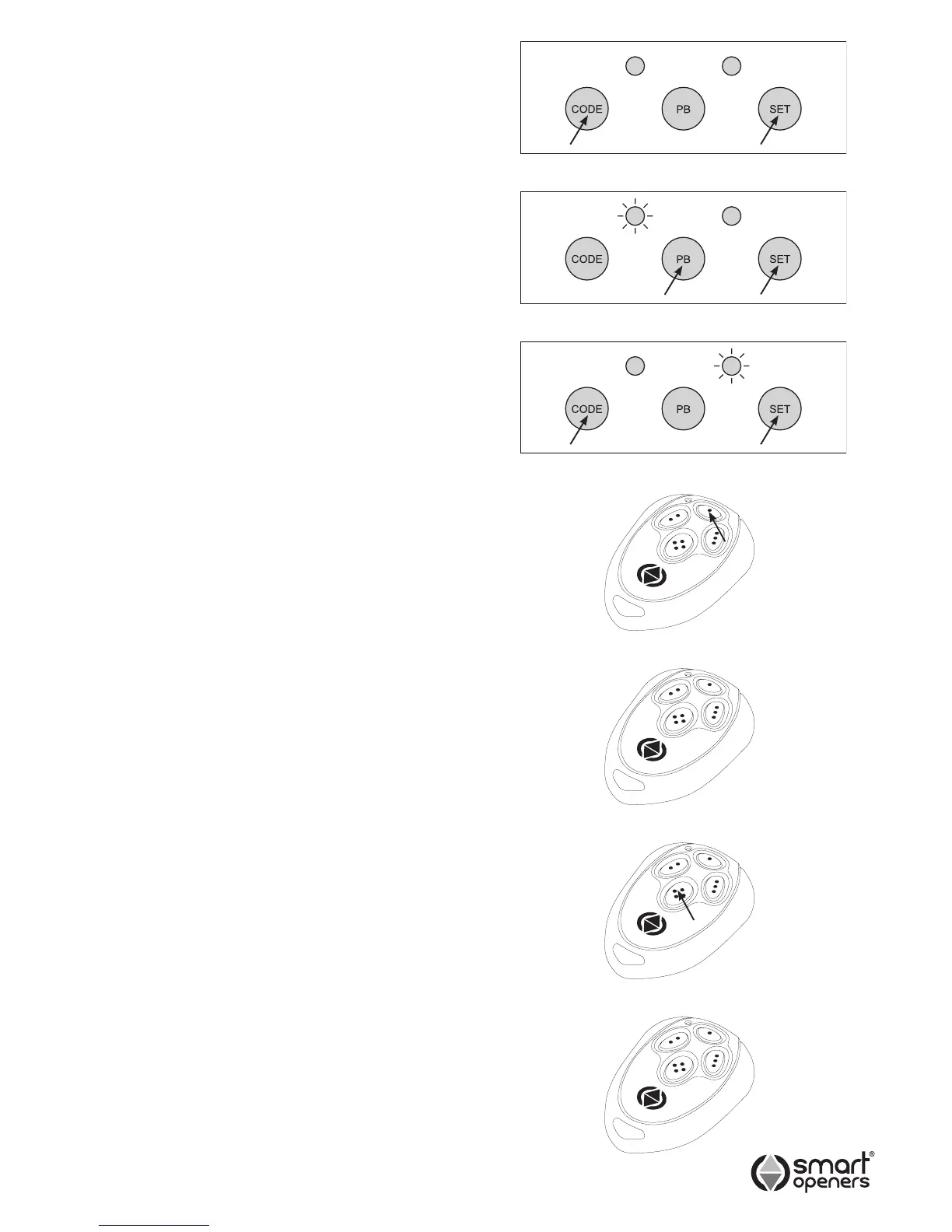
1 Press and hold CODE + SET for 3 secs. The yellow
open LED will light up indicating Sectional Mode.
(Fig. 11).
2 Press PB to change to Tilt Mode. The red close LED
will illuminate.
3 Press SET to save setting and exit.
Note: To revert to Sectional Mode repeat steps above.
Setting Limits Via Controller
1 Press SET for 3 secs to enter set up mode.
2 Press and hold PB to move the door to the desired
open position and release (the yellow open LED will
illuminate to indicate the open cycle). If you over shoot
the desired position press CODE to drive the door
down. Fig. 12.
3 Press SET to conrm.
4 Press and hold CODE to move the door to the desired
closed position (the red close LED will illuminate to
indicate the close cycle). If you over shoot the desired
position press PB to drive the door up. Fig. 13.
5 Press SET to conrm.
6 The opener will now run through a full cycle to
measure the force margin required to open and close.
If no further settings or adjustments are required, the
system is now ready to use.
Setting Limits Via Transmitter
You can set limits via a coded transmitter once the motor
position has been set.
1 Press SET for 3 secs to enter set up mode.
2 Press TX Button 1 to move the door to the desired open
position. If you over shoot the desired position press
Button 4 and move the door down.
3 Pause for 5 secs to set. (Fig. 15).
4 Press TX Button 4 to drive the door to the closed
position. If you over shoot the desired position press
Button 1 and move the door up.
5 Pause for 5 secs to set. (Fig. 17).
If no further settings or adjustments are required, the
system is now ready to use.
Resetting Limits
If you are not happy with the limits positions and you are
still in the process of setting limits, pause for 10 secs to
abort limits set up then press SET again for 3 secs and
repeat initialising procedure as per above.
If limits set up and door force margin prole has been
completed, to reposition limits press SET for 3 secs to
reenter set up mode.
Fig. 14
Fig. 16
Fig. 15
Fig. 17
Press Button 1
to open door
Press Button 4
to close door
Pause for 5 secs
to set open limit
Pause for 5 secs
to set close limit
Fig. 11
Fig. 12
Fig. 13


 To Next Page