T4 (053B) Series Installation Guide
CD354/220116 Smartscan Ltd
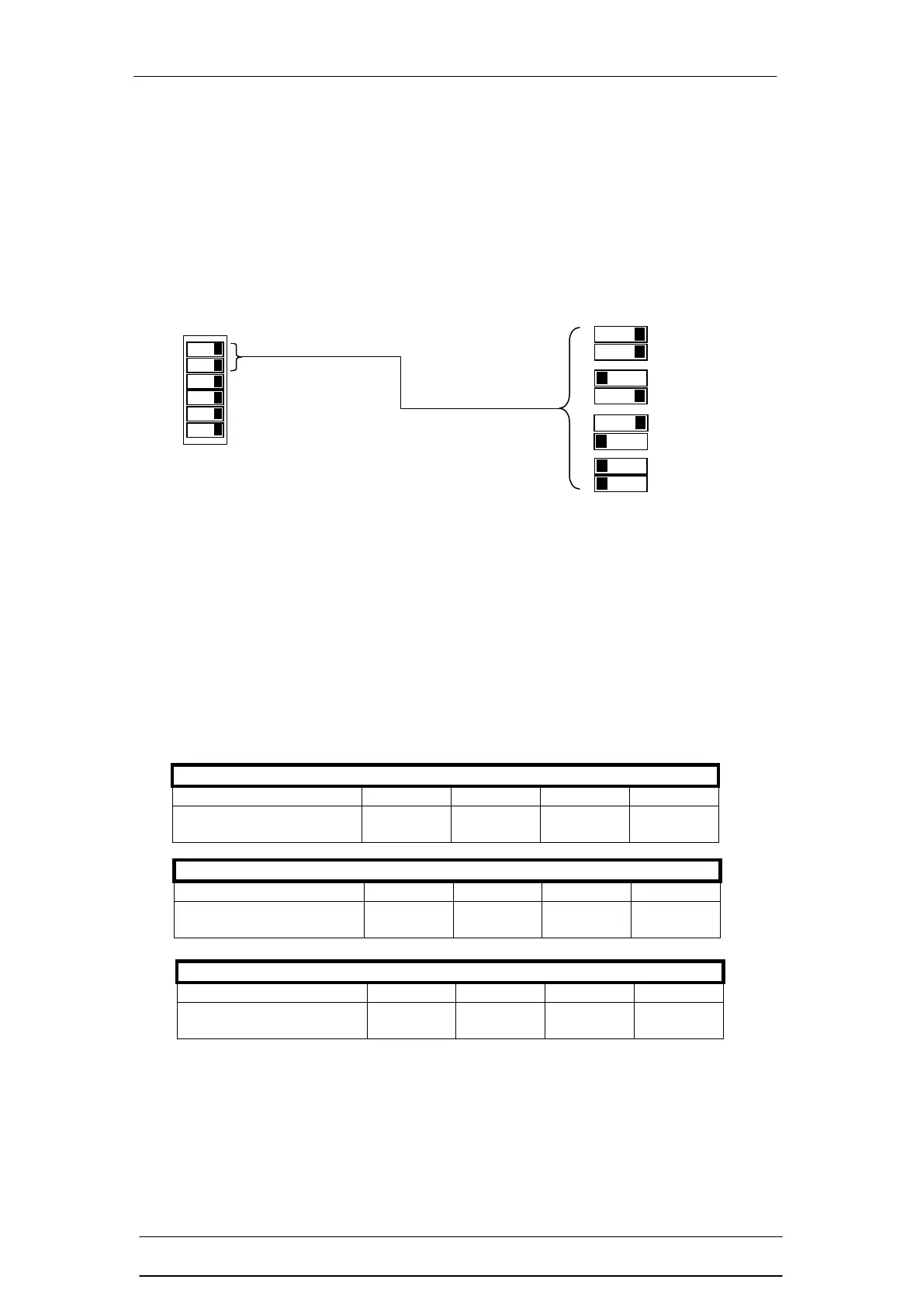
There are four options,
1) OFF
2) 1 beam
3) 2 adjacent beams
4) 3 adjacent beams
These options are selectable at DIP switches 1 & 2 as shown in the diagram
below in the direct settings mode.
The floating blanking function is particularly useful for those applications where,
for example, a work piece is moving up and down within the infrared field of the
light curtain as part of the manufacturing process. This allows the operator to
manipulate the work piece safely without shutting down the machine.
Using the floating beam blanking function of the T4 (053B) series safety light
curtain will change the original Object Detection Capability (ODC). The table
below shows the change to the original ODC (14mm, 30mm and 40mm) when
using the 1, 2 or 3 beam floating blanking options.
Floating Beam Blanking (14 mm Detection Capability)
Object Detection
Capability (ODC)
Floating Beam Blanking (30 mm Detection Capability)
Object Detection
Capability (ODC)
Floating Beam Blanking (40 mm Detection Capability)
Object Detection
Capability (ODC)


 To Next Page