T4 (053B) Series Installation Guide
CD354/220116 Smartscan Ltd
Learn Settings
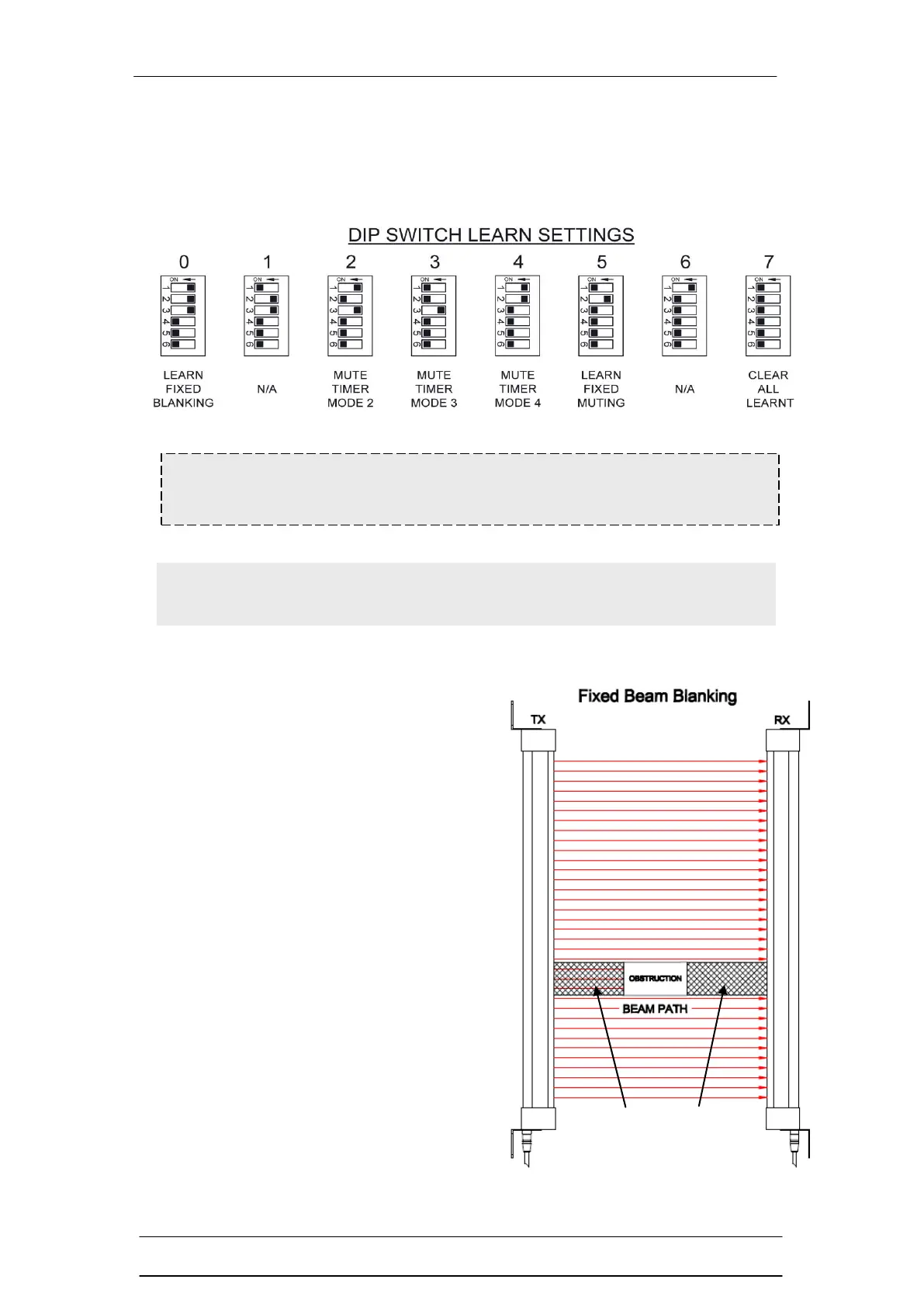
The 6 DIP switch settings available in Learn Settings are shown in the diagram
below.
Learn Setting 0 - Fixed Beam Blanking
Fixed beam blanking allows the user to
deselect a fixed area of beams in the light
curtain’s sensing field. This is typically
used where the application environment
dictates that a stationary object or fixture
is causing a permanent obstruction within
a portion of the sensing field.
The remaining unobstructed area of the
light curtain’s sensing field remains active
(protecting). If something blocks the
active part of the sensing field it will cause
the safety outputs (OSSDs) to go to an
OFF state and initiate a machine stop
condition.
Warning The two hard-wired mute input connections to the light
curtain must be disconnected when using the Learn mode.
Note During this time the safety outputs (OSSDs) will remain in
the off state.



 To Next Page