USE - 4791477A418/A
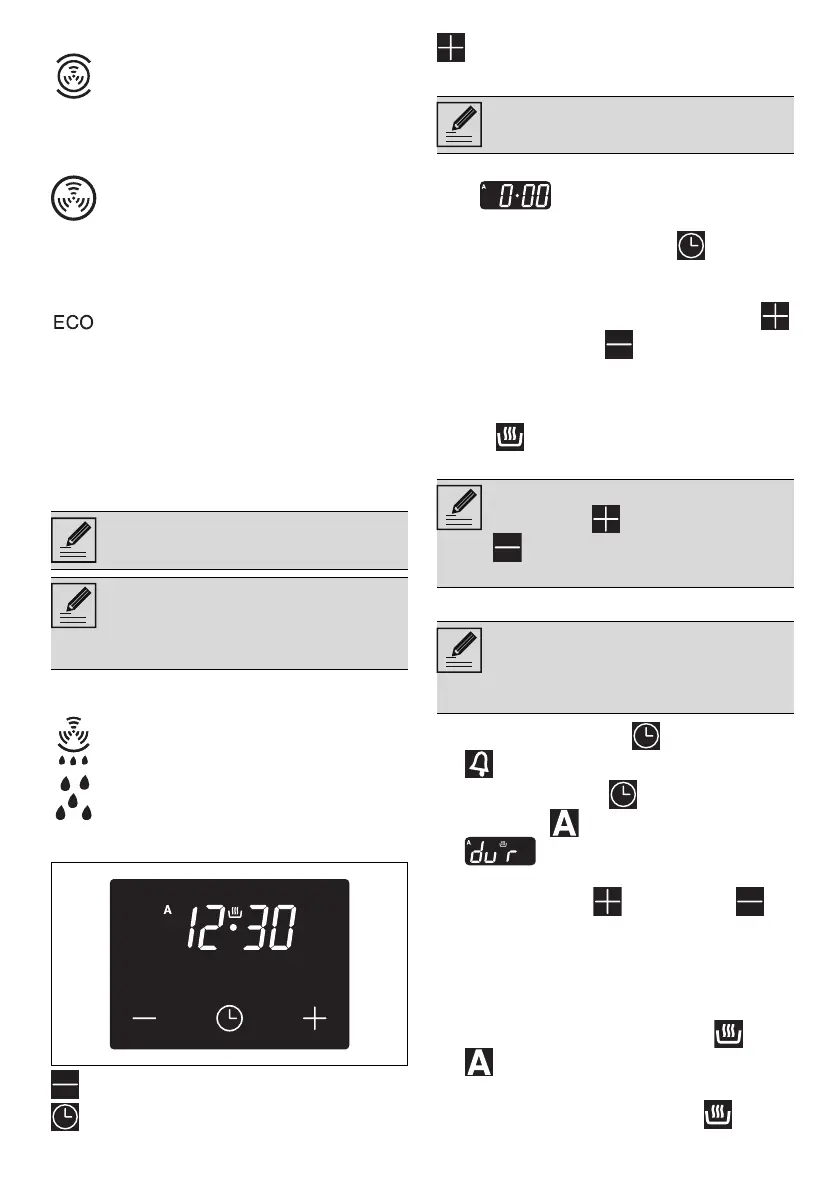
TURBO
CIRCULAIRE
ECO
VAPOR CLEAN (on some models only)
Digital programmer
Decrease key
Clock key
Increase key
Setting the time
On the first use, or after a power failure, the
digits will be flashing on the
appliance’s display.
1. Hold down the clock button for two
seconds. The dot between the hours and the
minutes flashes.
2. The time can be set via the increase key
and decrease key . Keep the button
pressed to increase or decrease rapidly.
3. Wait 7 seconds. The dot between the hours
and the minutes stops flashing.
4. The symbol on the display indicates that
the appliance is ready to start cooking.
Timed cooking
1. Keep the clock button pressed until the
symbol appears.
2. Press the clock key again. On the
display the symbol and the text
appear, alternating with the
current time.
3. Use the increase and decrease
keys to set the required minutes of cooking.
4. Select a function and a cooking
temperature.
5. Wait approx. 5 seconds without pressing
any button in order for the function to
activate. The current time and the and
symbols will appear on the display.
At the end of cooking the heating elements will
be deactivated. On the display, the symbol
Allows quick cooking on multiple
shelves without mixing the aromas.
Perfect for large volumes that call for
intense cooking.
The heat is distributed quickly and
uniformly. Suitable for all dishes, ideal
for cooking on multiple levels without
mixing smells or flavours.
This function is particularly suitable for
cooking on a single shelf with low
energy consumption.
It is recommended for all types of food
except those that may produce a large
amount of moisture (e.g. vegetables).
To obtain maximum energy savings and
reduce cooking times, it is
recommended to place food in the
oven without preheating.
When using the ECO function, avoid
opening the door during cooking.
Cooking (and preheating) times are
longer with the ECO function and may
depend on the amount of food in the
oven.
This function facilitates cleaning using
the steam produced by a small amount
of water poured onto the depression on
the bottom.
If the time is not set, the oven will not
switch on.
To change the time, hold down the
increase key and decrease key
at the same time for two seconds,
then set the time.
Timed cooking is the function which
allows a cooking operation to be
started and then ended after a specific
length of time set by the user.



 To Next Page