21
Icon and symbol glossary
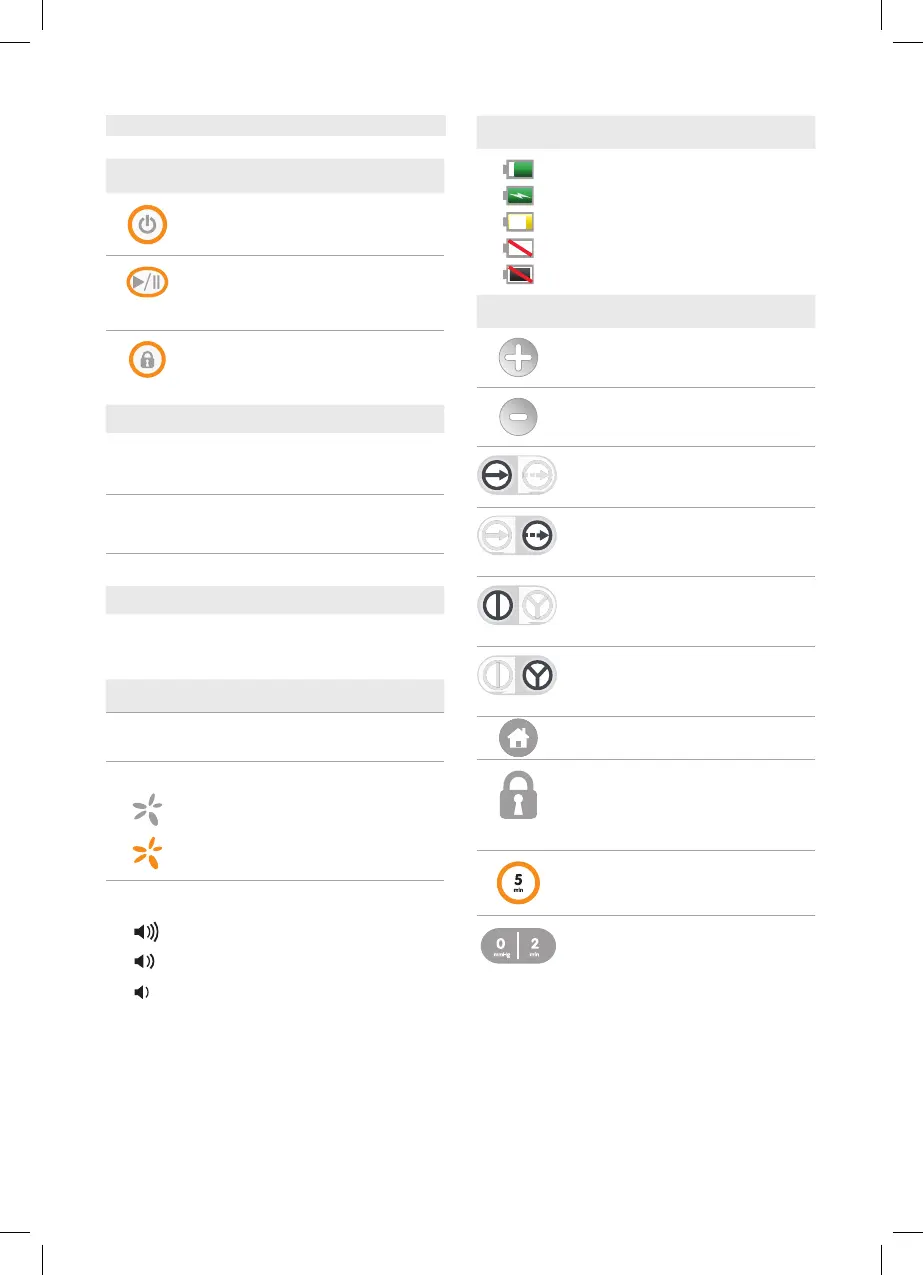
Operation buttons
Power Press and hold for 2 seconds to
power on or off device.
Start/Pause Therapy Press to begin
therapy. Press to pause therapy when
therapy is active.
Lock/Unlock Press and hold for 2 seconds
to lock or unlock touchscreen and Start/
Pause Therapy button.
Status indicator
Green
Therapy is active
All conditions normal
Yellow
Alarm state
Attention required
Off
No therapy; inactive
External power indicator
Green
Device connected to power supply
Off
Device not connected to power supply
Status bar
YY-MM-DD
HH:MM
Date
Time
Therapy indicator
• Not delivering therapy: gray
• Delivering therapy:
rotating orange
Alarm volume indicator
• High volume: three bars
• Medium volume: two bars
• Low volume: one bar
Battery indicator
• Battery full/charged: green
• Battery charging: lightning bolt
• Battery low: yellow
• Battery critically low: empty with red line
• Battery failure: gray with red line
Home and delivering therapy screens
Increase set point
Decrease set point
Continuous therapy mode
Maintains selected therapy level
Intermittent therapy mode
Cycles between selected set points of active
therapy and low/no therapy
Y-Connect Off
Select if connecting one wound dressing
to device
Y-Connect On
Select if connecting 2 wound dressings to
device
Navigate to Home screen
Interface locked
When displayed behind therapy set point,
indicates touchscreen and Start/Pause
Therapy button are locked
Current Intermittent therapy cycle time
Next Intermittent therapy set point and cycle time



 To Next Page