8
4
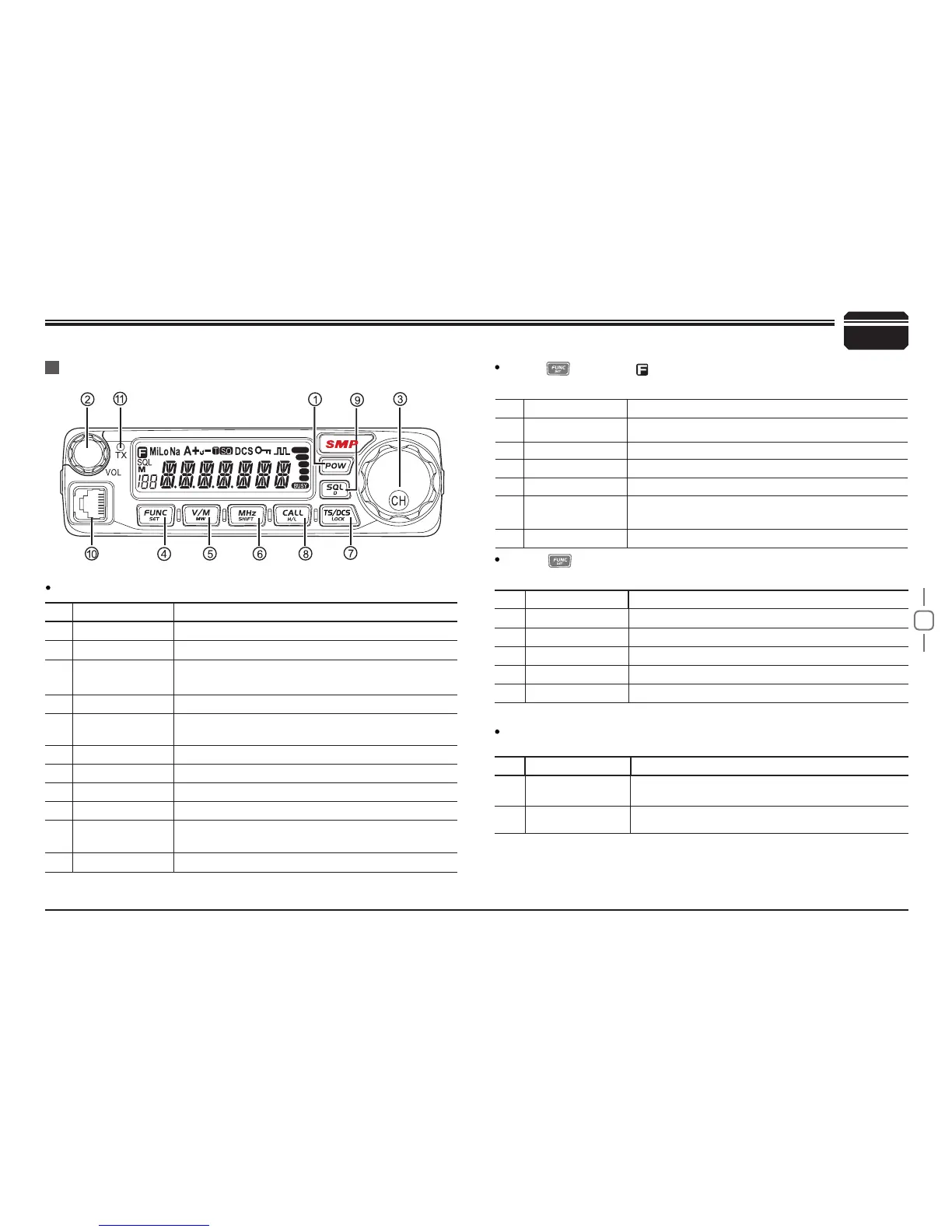
NO. KEY FUNCTION
1
Pow(Power) Power on/Off
2
VOL Adjust Volume Key
3
Main Dial
Change frequency, memory channel and scan
direction etc.
4
FUNC/SET Function Key
5
V/M/MW
Switches between VFO mode and Channel
mode
6
MHz/SHIFT Step Size Key ( step:1MHz)
7
TS/DCS/LOCK Sets CTCSS and DCS value
8
CALL/H/L Call key
9
SQL/D Squelch off
10
Data Terminal/
Mic.connector
Data reading/writing, cloning and Microphone
connection port
11
TX lights during Transmitting
NO. KEY FUNCTION
4
FUNC/SET Conrms the selective functions and exit
5
V/M/MW Stores data into channels
6
MHz/SHIFT Sets offset direction and offset frequency
7
TS/DCS/LOCK Sets Keypad lock function
8
CALL/ H/L
Switches between HI, MID and LOW power
transmission
9
SQL/D Compander mode on/off
NO. KEY FUNCTION
5
V/M/MW Erase the memory
6
MHz/SHIFT Switches between Wide/ Narrow band
7
TS/DCS/LOCK Auto dialer
8
CALL/H/L
Enters clone data function mode
9
SQL/D Enters power supply voltage indication mode
NO. KEY FUNCTION
4
FUNC/SET
Press and hold for 2s to enter the Setting
mode
9
SQL/D Monitor mode
Getting Acquainted
Front panel
Press key until icon appears then press the following
key.
Press
key and following key together to activate
following function:
Functions that require continuous pressing following key
to be activated
Basic Functions


 To Next Page