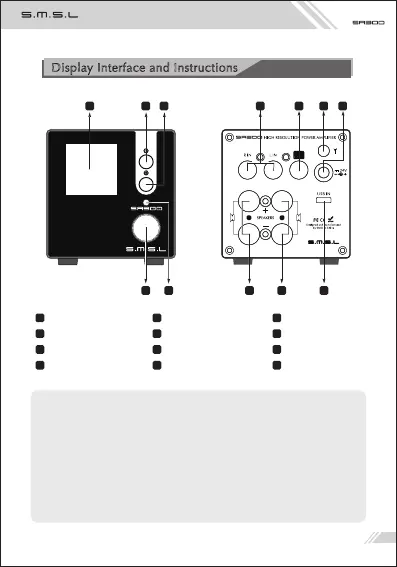
Display Interface and Instructions
Bluetooth pairing method*:
The phone turns on Bluetooth pairing, searches for and selects “SMSL BT5.0A”.
If the phone displays “Connected”, the pairing is successful. If the pairing isn't
successful, please refer to the Bluetooth clear function on page 8. After clearing
the Bluetooth device connected to the SA300, please try again!
Speaker output**:
Please pay attention to the polarity when connecting the speakers, it must
follow the mark on the unit, to avoid any effect to the sound quality.
Display
Knob
Subwoofer output
Right speaker output** Left speaker output** USB input
8
5
2
1
4
7 9
6
3
10
Power button
Remote window
Bluetooth antenna*
Input selection button
LINE IN jacks
Power input (DC 24V)
11 12
4
6
2
1
3
5
7 8
10 11
9
12
05



 To Next Page