16
(Windows 7)
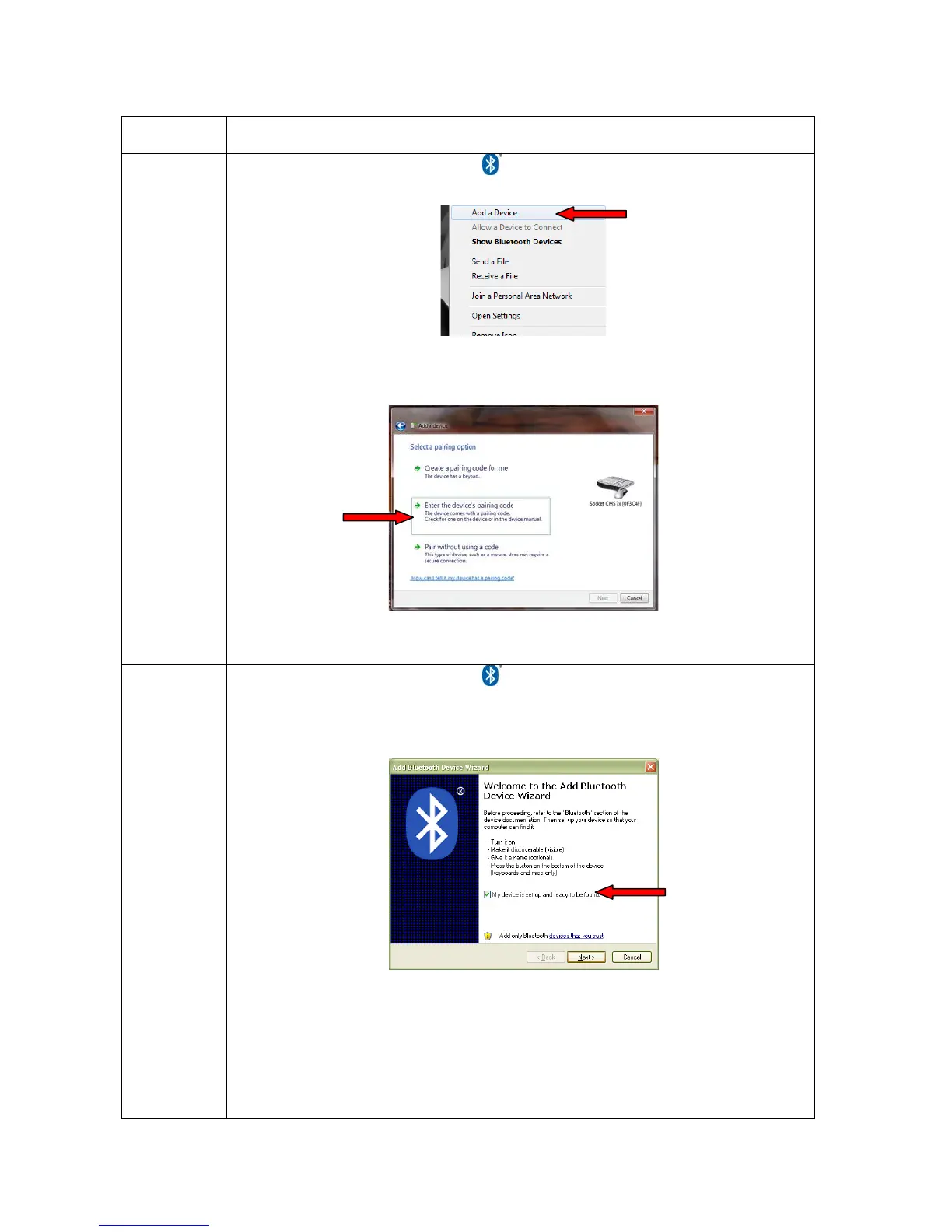
1. Right-click on the Bluetooth icon in the system tray (notification area). In the
pop-up menu, click Add a Device. A device search will begin.
2. In the device list, select Socket CHS [xxxxxx] and click Next.
3. If prompted, select Enter the device’s pairing code. Enter the passkey 0000
(four zeroes). Click Next.
4. Follow the remaining screens to complete the wizard.
(Windows
Vista / XP)
1. Right-click on the Bluetooth icon in the system tray (notification area). In the
pop-up menu, click Add a Bluetooth Device.
2. In the welcome screen, check the box My device is set up and ready to be
found. Click Next. A device search will begin.
3. In the device list, select Socket CHS [xxxxxx]. Click Next.
4. If prompted, select Use the passkey found in the documentation and enter
the passkey 0000 (four zeroes). Click Next.
5. Follow the remaining screens to complete the wizard.















 To Next Page