19
7. Messages
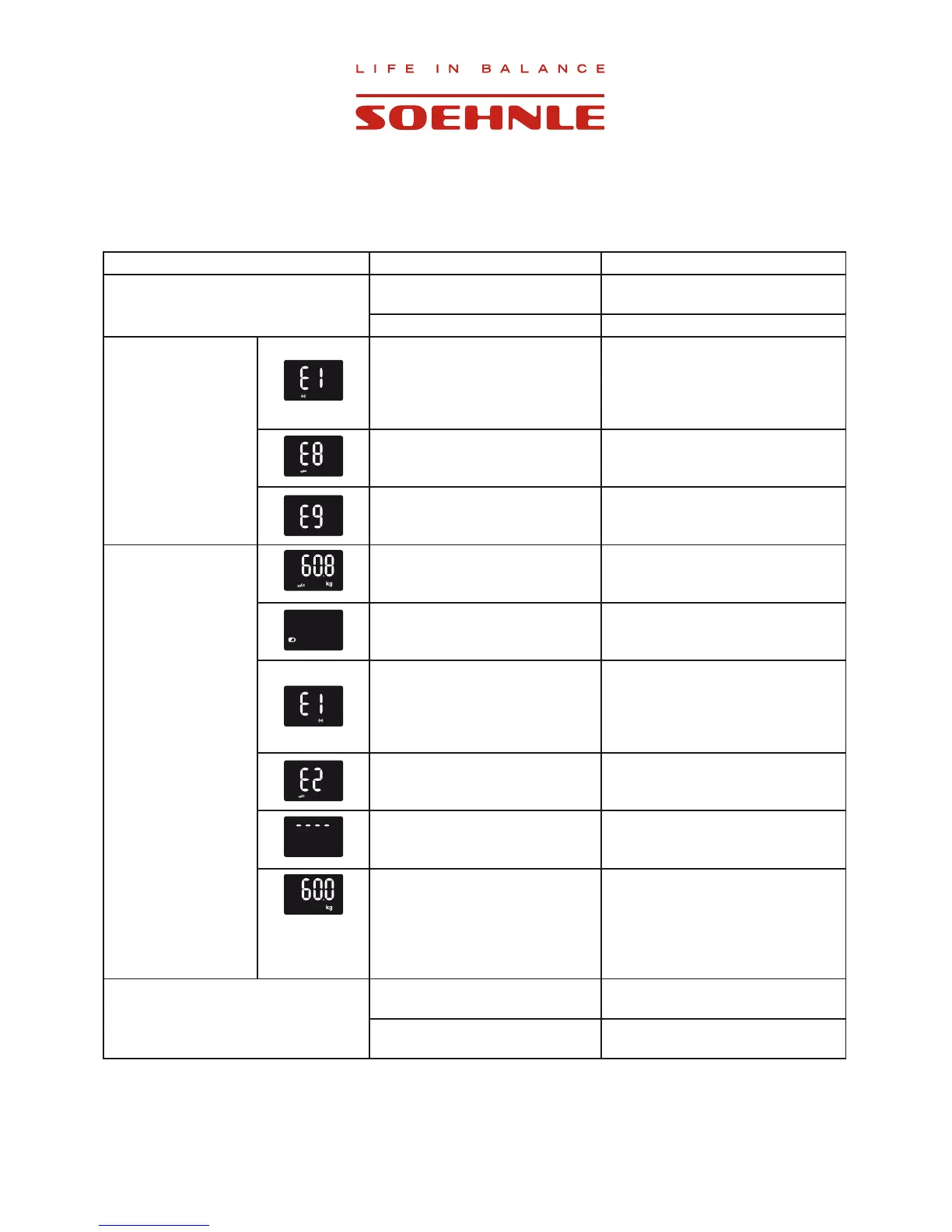
Problem Cause Solution
No display
No batteries or batteries are
empty
Insert or replace batteries
Batteries inserted incorrectly Insert batteries correctly
Display while
the product is
being activated or
synchronized
1. Radio communication is
interrupted
2. Distance between scale and
web box is too great during
activation
Activate the product again with a
distance of 20 cm between scale
and web box.
Network error Check the network connection
The product has not been
synchronized
Synchronize the product (see
chapter 2.8)
Display while the
product is being used
Broadband error
:$1/('ÀDVKHV
Check the internet connection
Weak batteries Replace batteries
1. The connection between
scale and web box has been
interrupted
2. The scale is outside of the
radio range
Bring the scale back to the radio
range of the web box.
Interrupt the power supply of the
web box for 30 seconds.
Your measurement results cannot
be transmitted due to a network
error
Check the network connection
Overload display Load scale with max. 150 kg.
BIA is
not being
displayed
The user is not standing on the
scale with bare feet
Step onto scale with bare feet
Last measured data is not being
displayed in the personal account
The measured data cannot be
allocated to a user.
Go to your personal account and
accept the data (see chapter 3.0)
Broadband error
:$1/('ÀDVKHV
Check the internet connection



 To Next Page