14
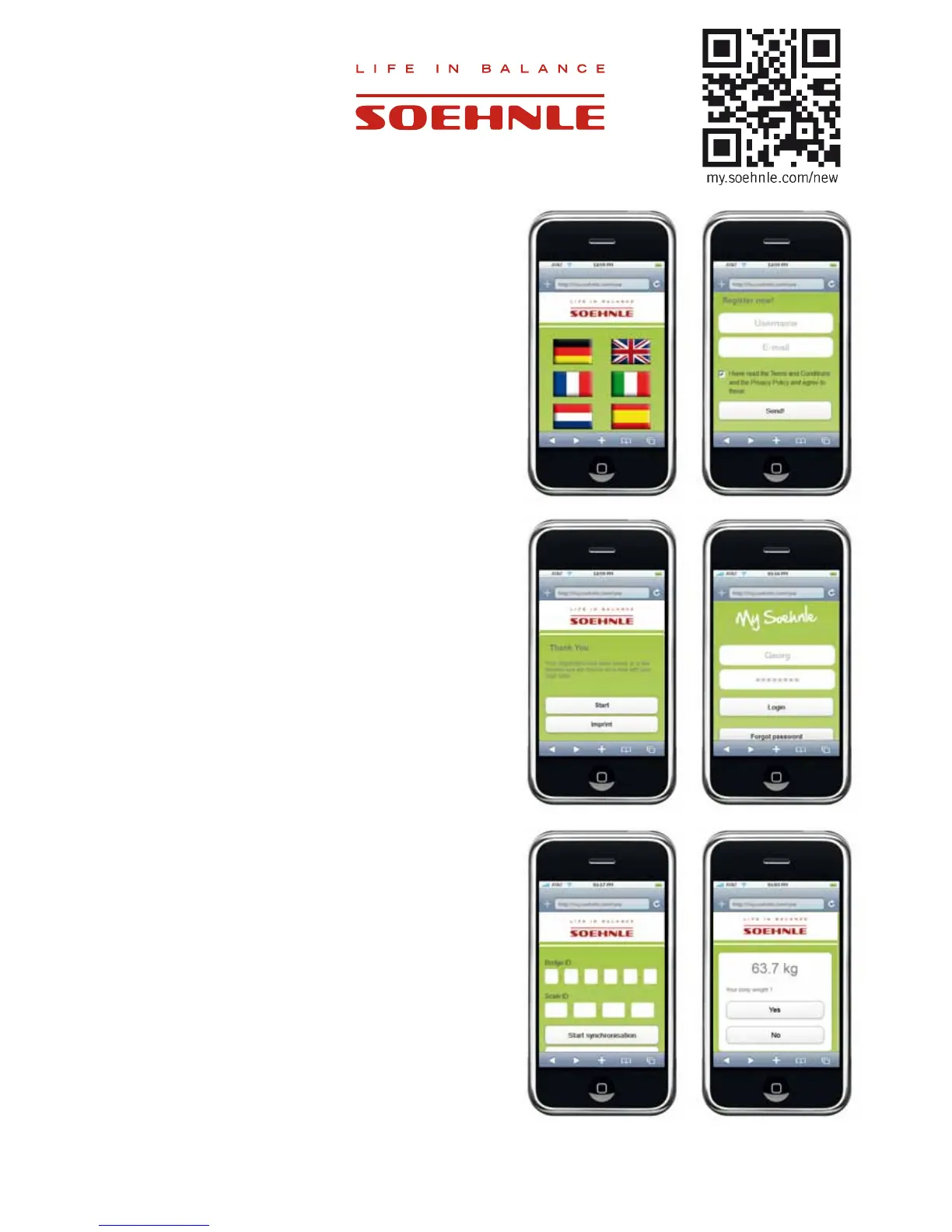
2.8 Setting up the user account
1. Visit the website “my.soehnle.com/new”
2. Select the desired language.
3. Go to ”Registration” and enter your user name and your
personal email address.
Note: The scale can be used by up to 8 persons. Each
user must have its own email address.
4. Continue with ”Send”.
5. You will now receive an email with your user name and
password.
Note: You can see your personal data at any time in
your login area.
6. Select ”Start” and enter your user name and password.
Continue with ”Login”.
7. Enter the ID number of the web box (bridge) and the
VFDOH<RXZLOO¿QGWKHVHRQWKHERWWRPRIWKHUHVSHFWLYH
product.
Note: Please note that for synchronization, scale and
web box must be ready for operation and an internet
connection must be established (WAN and LAN LED
light up).
Start synchronization.
6WHSRQWRWKHVFDOHZLWKLQWKHQH[W¿YHPLQXWHVZLWK
bare feet and if possible undressed, and stand still until
the display goes out.
9. If your weight is being displayed in ”My Soehnle”,
SOHDVHFRQ¿UPXVLQJ´<HV´
10. Personal data will be entered next (chapter 2.8.1)



 To Next Page