21
Media
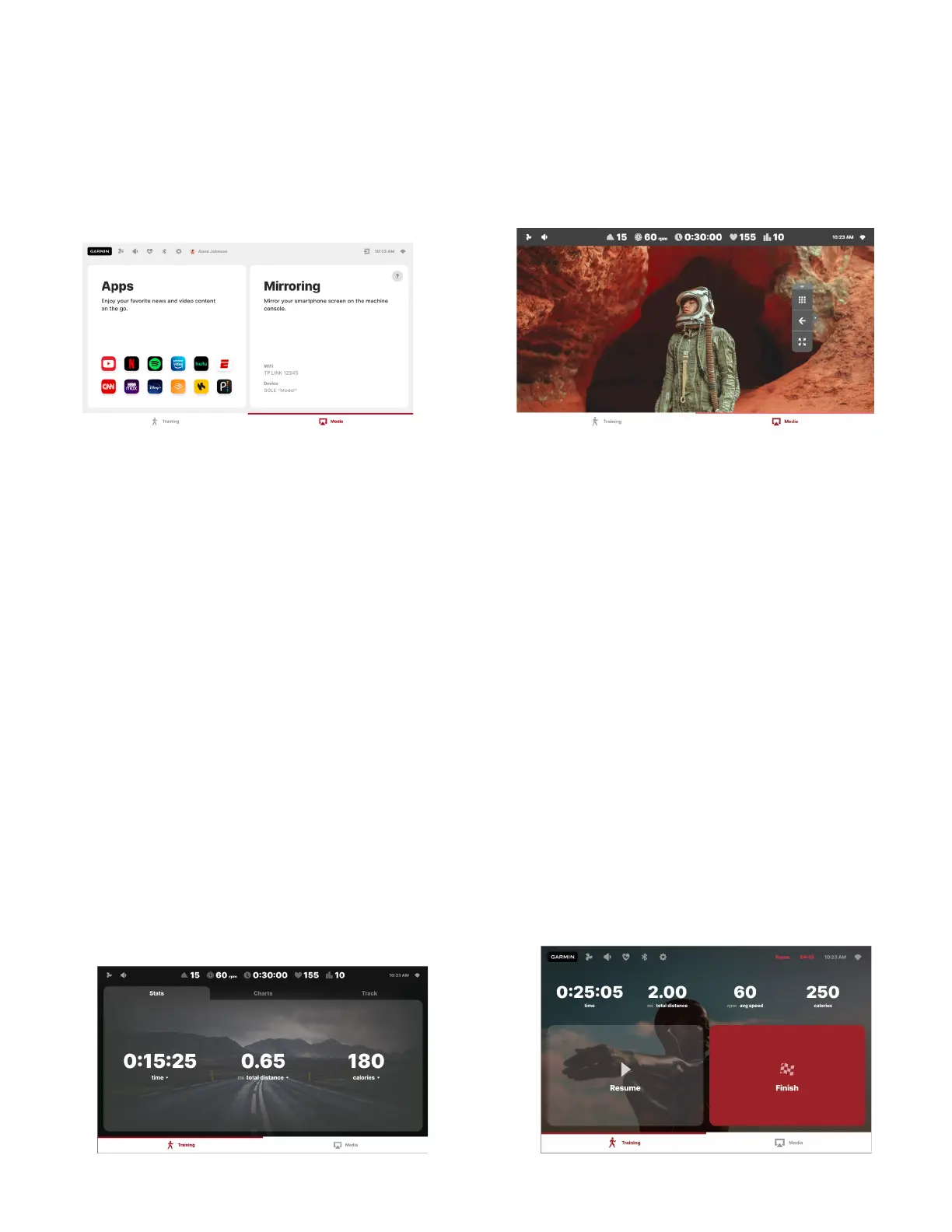
Tap on the right tab of the bottom panel to access the Media section. Choose from a variety of pre-
installed third-party Apps, or use the Mirroring function to cast the content from your smartphone
directly to the console screen. For detailed instructions, press the ? icon.
Once the content is on, use the floating panel for navigation and operating full-screen mode. Touch
the panel’s top edge and drag the panel around the screen to find the perfect place for it, where it will
not prevent you from interacting with the content. Press Hide Panels to enter the full-screen mode
without stats on the top and tabs on the bottom and Show Panels to bring them back. Use the arrow
button on the right side of the panel to hide & show the text labels: it allows you to further minimize
the panel’s size. Press “Apps” to go back to the content sources selection.
Workout Mode
Once the workout has been started, the console will appear in its workout mode.
During the workout, switch between Stats, Charts and Track views of the Training section, or go to
the Media section to enjoy your favourite media content. In the Stats view, you can select the
parameters you would like to display by tapping on the number.
Please use physical keys to adjust the level and incline. Press the physical “STOP” key to pause the
workout. Here, you can get back to training or end your workout and see the summary. After 5
minutes of inactivity in the Pause mode, the workout will end automatically.


 To Next Page