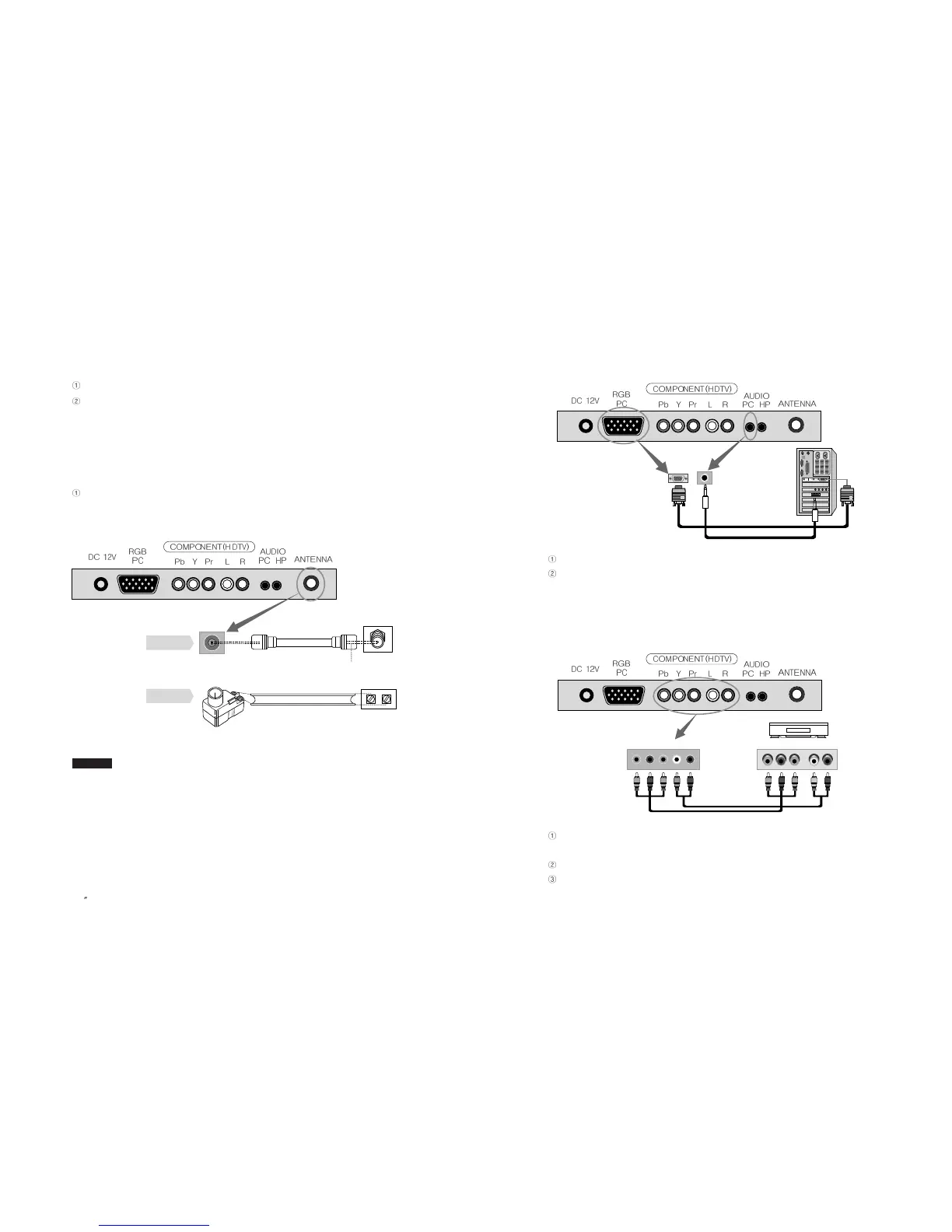
2-3. Connecting PC
Connect D-Sub Cable to D-Sub port on the TV and PC.
Connect Audio Cable (not included) to Audio output of a PC (stereo jack) and PC
Audio Input Port of the TV (stereo jack).
2-4. Connecting HDTV
Connect Component Cable (not included) to HDTV Connection ports of TV (Pb Y
Pr) and DTV Receiver.
Connect Audio Cable (not included) to Audio ports (L/R) of TV and DTV Receiver.
Cables should be connected to ports of the same colors.
25
PAL/SECAM
2-1. Connecting Power
The product automatically adjusts voltage.
Power Cable should be firmly connected to an outlet or DC adaptor in order not to
be pulled out or shake.
2-2. Connecting TV Antenna
When round cable (75Ω coaxial cable) is used, copper part of the cable should not
be bent.
1. When an outdoor antenna is used, it is recommended for a qualified technician to install it.
2. For weak radio wave, signal amplifier (purchased separately) is recommended for use.
Cautions
EN 24
15 TFT-LCD TV
TV antenna
Antenna converter
Connecting RF
cable
Connecting
feeder cable
RF cable
feeder cable
copper wire
TV Wall-outlet
TV Wall-outlet
Digital TV Broadcasting Receiver
<Input>
<Output>
<Input>
<Output>
Pb Y Pr L R Pb Y Pr L R



 To Next Page