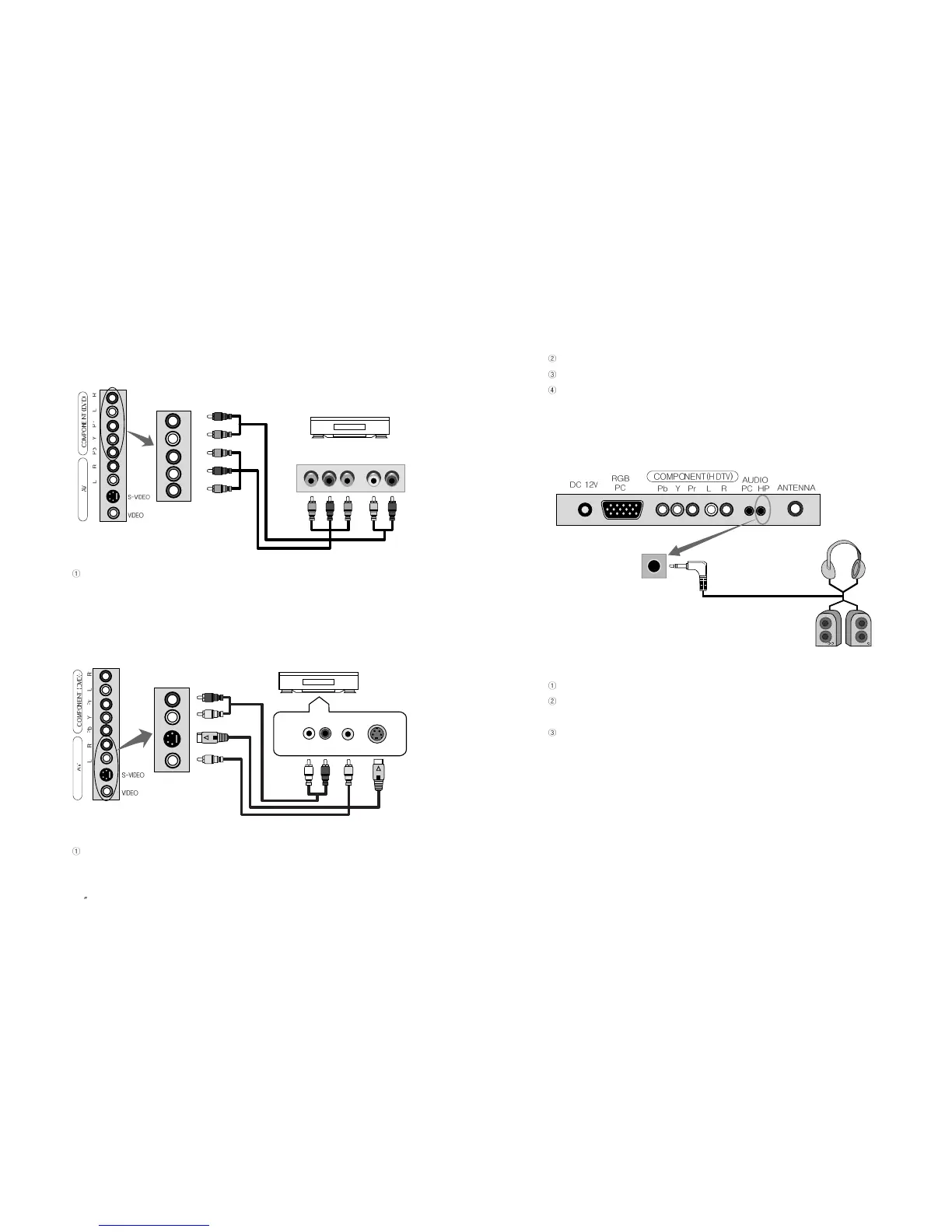
Cables should be connected to ports of the same colors.
Audio signals of S-VIDEO should be used with external audio signal cables.
S-VIDEO signal secures better picture quality than composite video signal.
2-7. Connecting Headphone(speaker)
Connect Headphone (not included) to the Headphone output port of the TV.
If possible, use headphones of 8ohms impedance. Otherwise output volume may
be too low or too loud.
In case of connecting to speakers, connect speakers with amps. If connected with
speakers without amps, the output volume may be low.
27
PAL/SECAM
2-5. Connecting DVD
Connect Component Cable (not included) to Component ports of TV and DVD
player. VCR, Set-Top box or camcorder.
2-6.
Connecting VIDEO/S-VIDEO Input
Connect Video/Audio Cable (not included) and S-VIDEO Cable to Video port of TV
and camcorder, game machines, VCR, DVD player or Set-Top box.
EN 26
15 TFT-LCD TV
DVD Playera
Pb Y Pr L R
R
L
Pr
Y
Pb
Audio Video S-VIDEO
Video & DVD Player
L R
<Input>
<Output>
<Input>
<Output>
<Output>



 To Next Page