43
22. Log/Configuration Transfer
For diagnostic purposes, the Event Log and System Configuration database can be transferred from
the Radio to a local PC via FTP. The default names of these files are as follows:
CONFIG_VARS-”system_name”.MMDDYYhhmm
events-”system_name”.MMDDYYhhmm
clients-”system_name”.MMDDYYhhmm
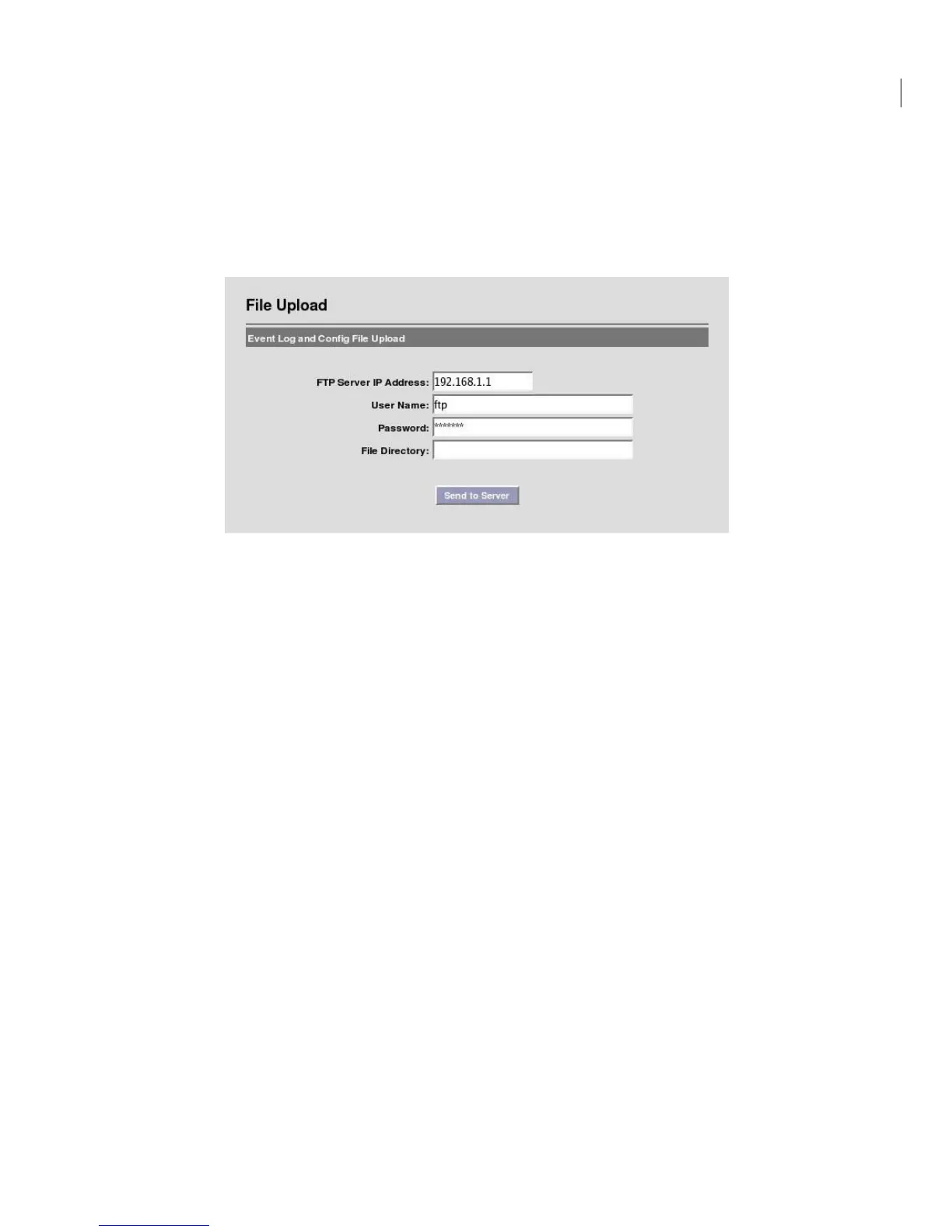
Navigate to Diagnostics -> File Upload to access the following screen:
FTP Server IP Address: Local FTP server address.
User Name: User name used to login to the FTP server.
Password: Password used to login to the FTP server.
File Directory: Location on Local FTP server to save Event and Configuration files. If left blank,
files will be transferred to the FTP server’s home directory.
Notes:
(a) FTP Username and password fields are case sensitive with no spaces allowed. Fields must be
between 1 and 32 characters in length.
(b) Legal characters are: all alphanumerics, plus the following symbols:
@ (at sign) - (dash) . (period) ‘ (tick) _ (underscore)


 To Next Page