DISTRIBUTION: INTERNAL + SOLOPROTECT CUSTOMERS
SoloProtect ID US: User Guide
US SoloProtect ID User Guide v2.0 d1909189
© SoloProtect Ltd, 2018 Page 22 of 31
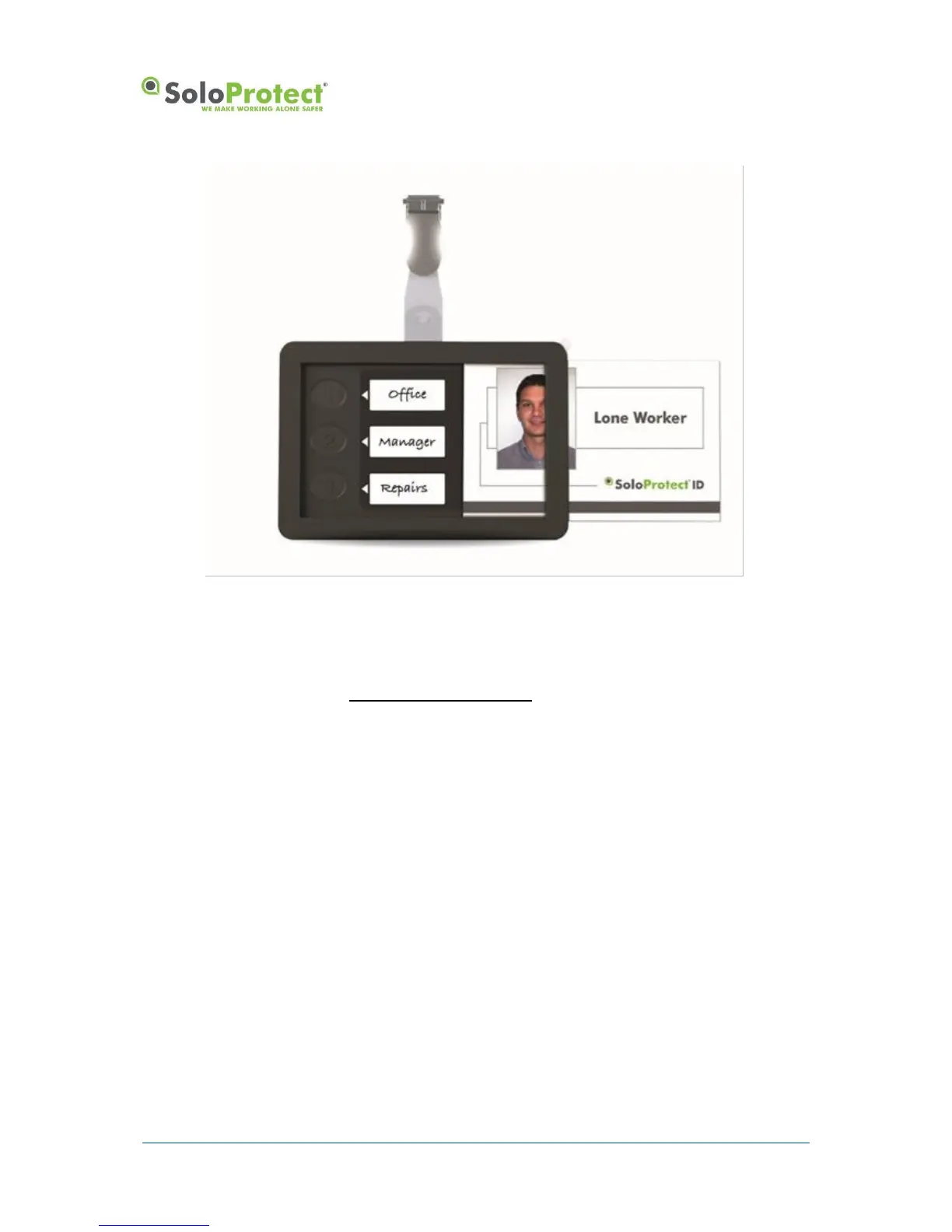
Figure 14: Multifunction or User Buttons
*Check with your Employer or your SoloProtect Account Manger as to whether you have this function enabled.
4.2 Ready2Talk (US and Canada only) – Multi-Function Buttons*
The 3 multi-function buttons on the front of the device are usually covered by your ID Card. These
buttons are not designed for discreet use or to be deployed as part of a situation where you require
assistance due to your safety being compromised.
A Pre-designated multi-function button can be used to trigger a live 2-way voice call to the SoloProtect
EDC via the Ready2Talk function. SoloProtect Ready2Talk is only to be used in non-alarm situations.
For example, if you have an uneasy feeling when walking to your vehicle late at night, it would be
appropriate to initiate Ready2Talk so that you have the added comfort of talking to an Operator until
you reach your vehicle.


 To Next Page