Display navigation SOLPLUS 25 - 55
SP25-55_User Manual_B8_EN_2012-11-06 14/32
6 Display navigation SOLPLUS 25 - 55
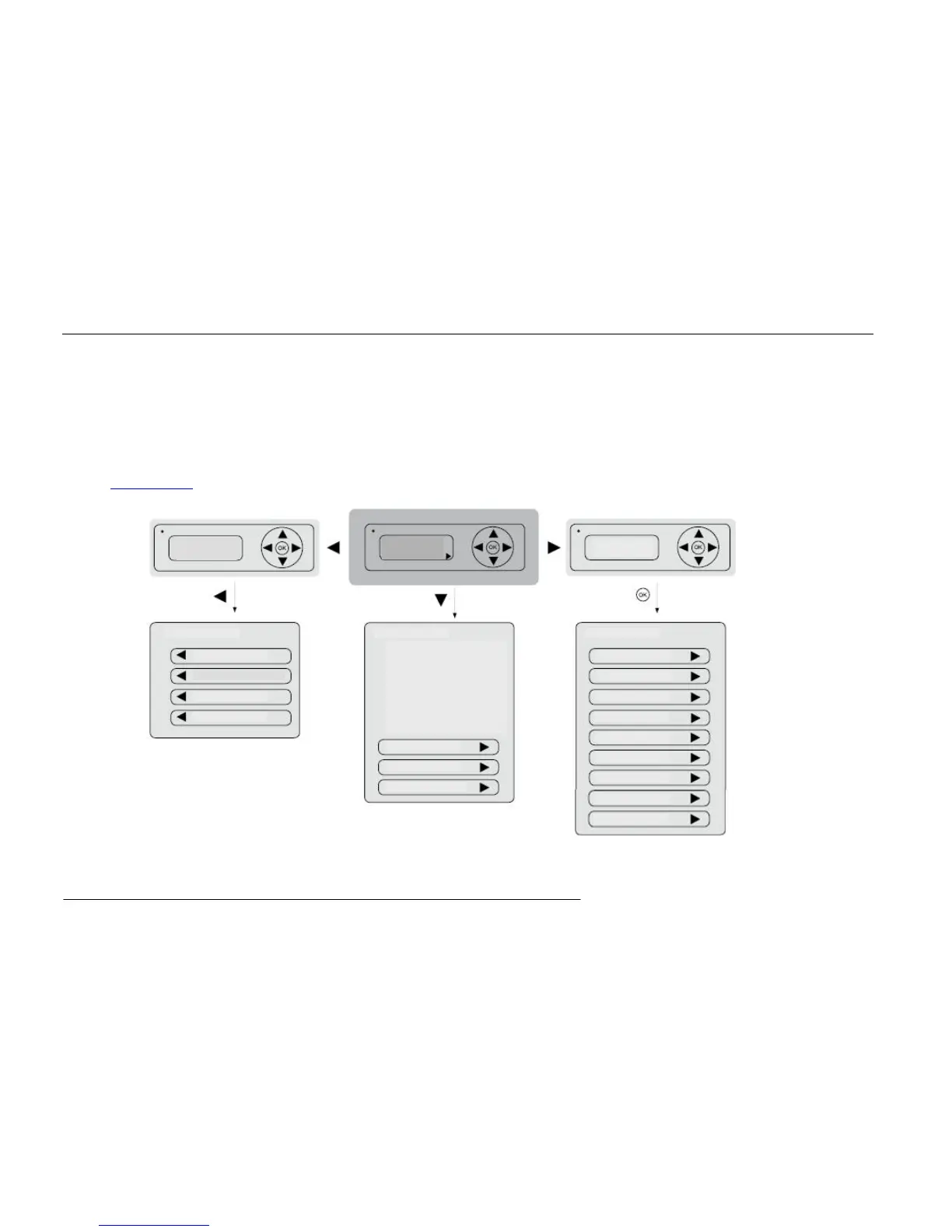
Base window: by pressing a button the display turns on and the main screen appears.
The basic menu is accessed by pressing the down arrow key on the display. In the basic menu, the yield values can be read. By pressing the arrow key left, you return to the base
window.
The main menu is accessed by pressing the arrow key to the right. Before entering the main menu, the password is requested. The sequence
(up/right/down/up/right/down), confirmed with “OK”, enters the main menu. Inside the main menu you could modify in several submenus the desired parameters. By pressing the
left key, you return to the base window.
The actual value menu could be accessed by pressing the arrow key left. It is separated into four menu groups. Inside, you could access several parameters. By pushing the
arrow key left again, you reach the following menus. At the end you get back to the base window. (more information on the display menu can be found on the CD and the download
section at www.solutronic.de).
Basic menu


 To Next Page