Files of the inverter
SP25-55_User Manual_B8_EN_2012-11-06 16/32
If you are interested in using SOLPLUS+ to monitor your inverter, please load the program and the
installation and user manuals of SOLPLUS+ from the CD supplied or download them from
www.solutronic.de.
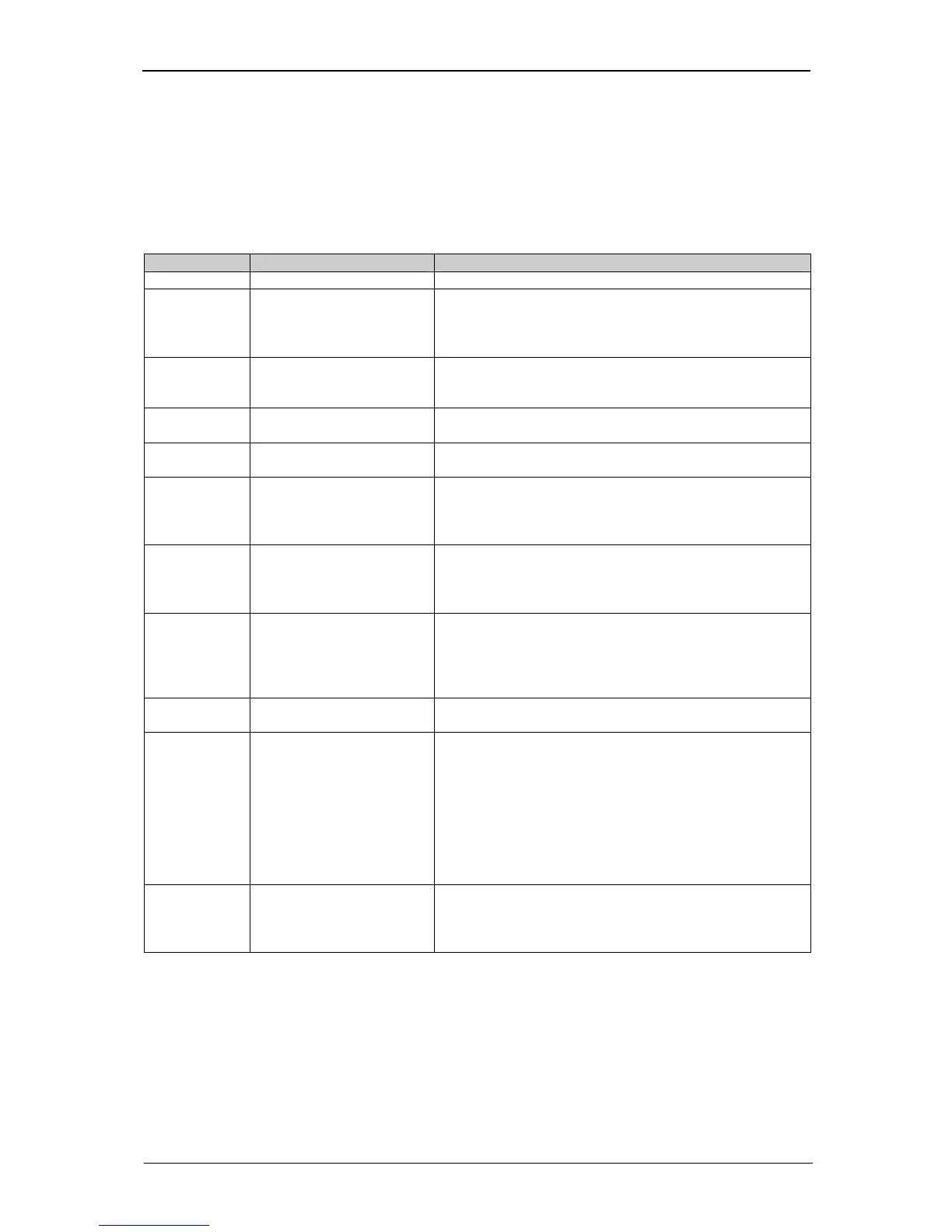
11 Files of the inverter
The inverter generates various "files", which can be read out via one of its communication ports and
communication modes.
File number Name Description
0 No file -
1 Fault memory The fault memory – a list of the last 100 faults, with
date, time and fault number. These are stored in the
sequence in which they occurred (with date and
timestamp).
2 List of all parameters A table showing all the parameters of the inverter, with
parameter number, parameter name, parameter value
and unit
5 List of actual values A table showing all parameters and the actual values,
i.e. values which can be changed
6 Data logger The data logger: entries with a time stamp and values
of the parameters
7 Annual energy logger A table in the form of a ring memory (endless loop
memory) about the preceding year with the achieved
yield of each respective day in kWh. Resolution: 0.1
kWh
8 Annual sensor logger A table in the form of a ring memory (endless loop
memory) about the preceding year with the achieved
"theoretical yield" of the insolation sensor (if connected)
on each respective day in kWh. Resolution: 0.1 kWh
9 Annual sensor/energy
logger
A table in the form of a ring memory (endless loop
memory) relating to the preceding year, with the
(if connected) on each respective day in kWh.
Resolution: 0.1 kWh
10 (A) Configuration of data
logger
A description of the configuration (contents) of the data
logger with the estimated storage times
13 (D) Installation monitoring A list with the yield values of the master, insolation
sensor and all slaves as well as the yield values of the
master, sensor and all slaves relative to the connected
nominal DC output. This list is in the form of a ring
memory (endless loop memory) and has been created
over the course of the preceding year. It cannot be read
until the integrated yield monitoring function has been
started and successfully ended (see chapter entitled
"Yield monitoring")
14 (E)
Alarms A list of the alarms which occurred on this day. These
are stored in this file in the sequence in which they
occurred. Additional information as well as the time are
also stored here
The above files can be created and read out using SOLPLUS+ or the web browser.


 To Next Page