User Manual
8 SolwaveOvens.com
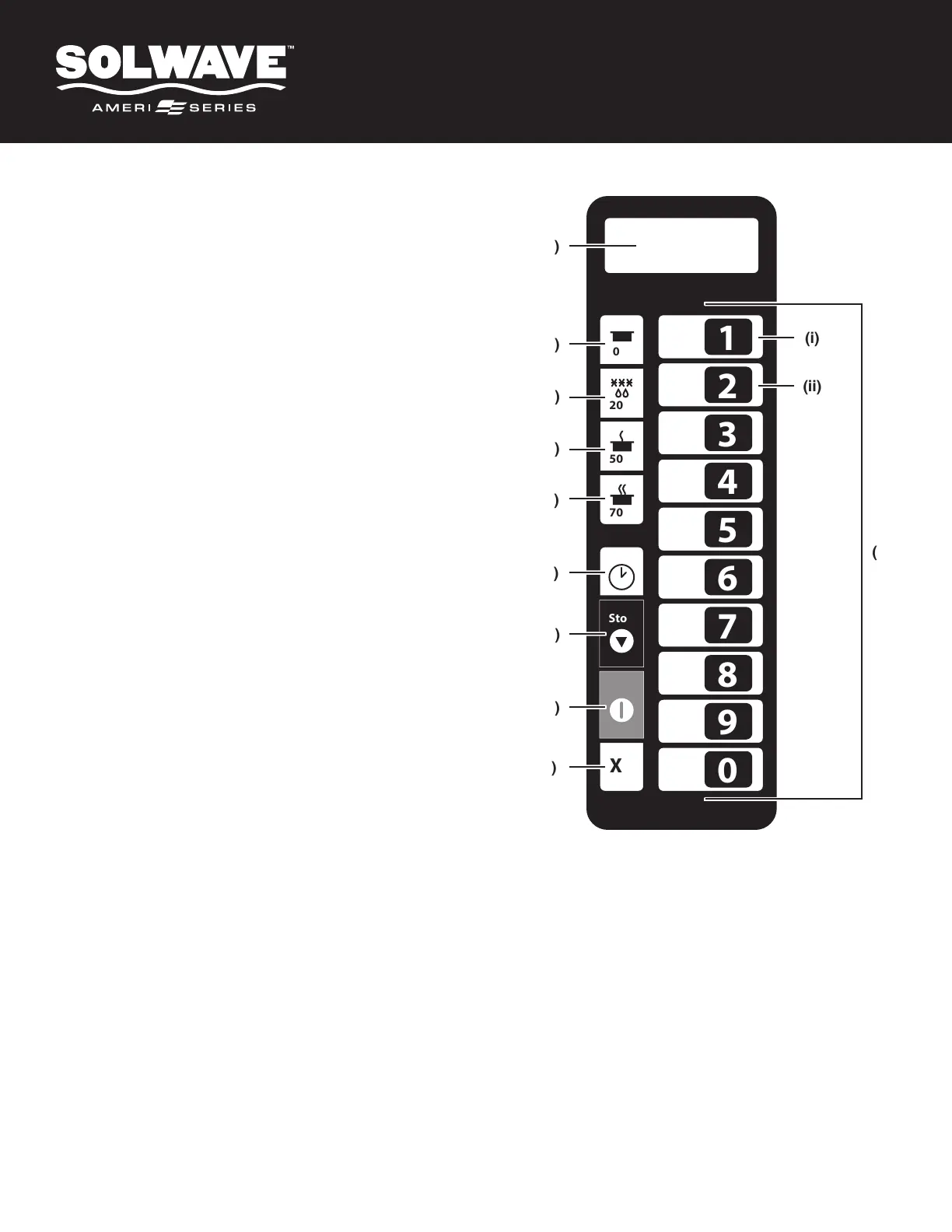
Control Panel
(A) Display
(B) Hold Key
(C) 20% Power/Defrost Key
(D) 50% Power Key
(E) 70% Power Key
(F) Manual Time Entry Key
Allows the operator to heat without changing the
preset program keys.
(G) Stop/Reset Key
Interrupts operation and/or exits modes.
(H) Start/OK Key
Begins cooking in Manual Time Entry Mode.
Restarts an interrupted cooking cycle.
Used to save setting and entries.
(I) X2/Double Quantity Cooking Key
Increases a preset cook time by a percentage of the
original cook time, also known as a "cook factor."
Used for cooking multiple servings of food.
(J) Number Keys
Used to operate preset cooking programs, enter
settings, and/or activate secondary key functions.
(K) Secondary Function Keys
To activate, press and hold corresponding number key.
(i) Programming Mode (1 Key).
Edit preset programs and/or create new programs
for customized cooking.
(ii) User Options (2 Key).
Allows the user to customize various oven settings.
1
0%
20%
50%
70%
Stop
Start
X2
2
3
4
5
6
7
8
9
0
(A)
(B)
(i)
(ii)
(J)
(D)
(C)
(E)
(F)
(G)
(H)
(I)
The switching operation of this microwave oven can cause voltage fluctuations on the supply line. The operation of this
oven under unfavorable voltage supply conditions can have adverse effects. This device is intended for the connection
to a power supply system with a maximum permissible system impedance Zmax of 0.10 Ohms at the interface point of
the user’s supply. The user has to ensure that this device is connected only to a power supply system which fulfills the
requirement above. If necessary, the user can ask the public power supply company for the system impedance at the
interface point.
(K)


 To Next Page