Solwise Ltd., www.solwise.co.uk, sales@solwise.co.uk
- 17 -
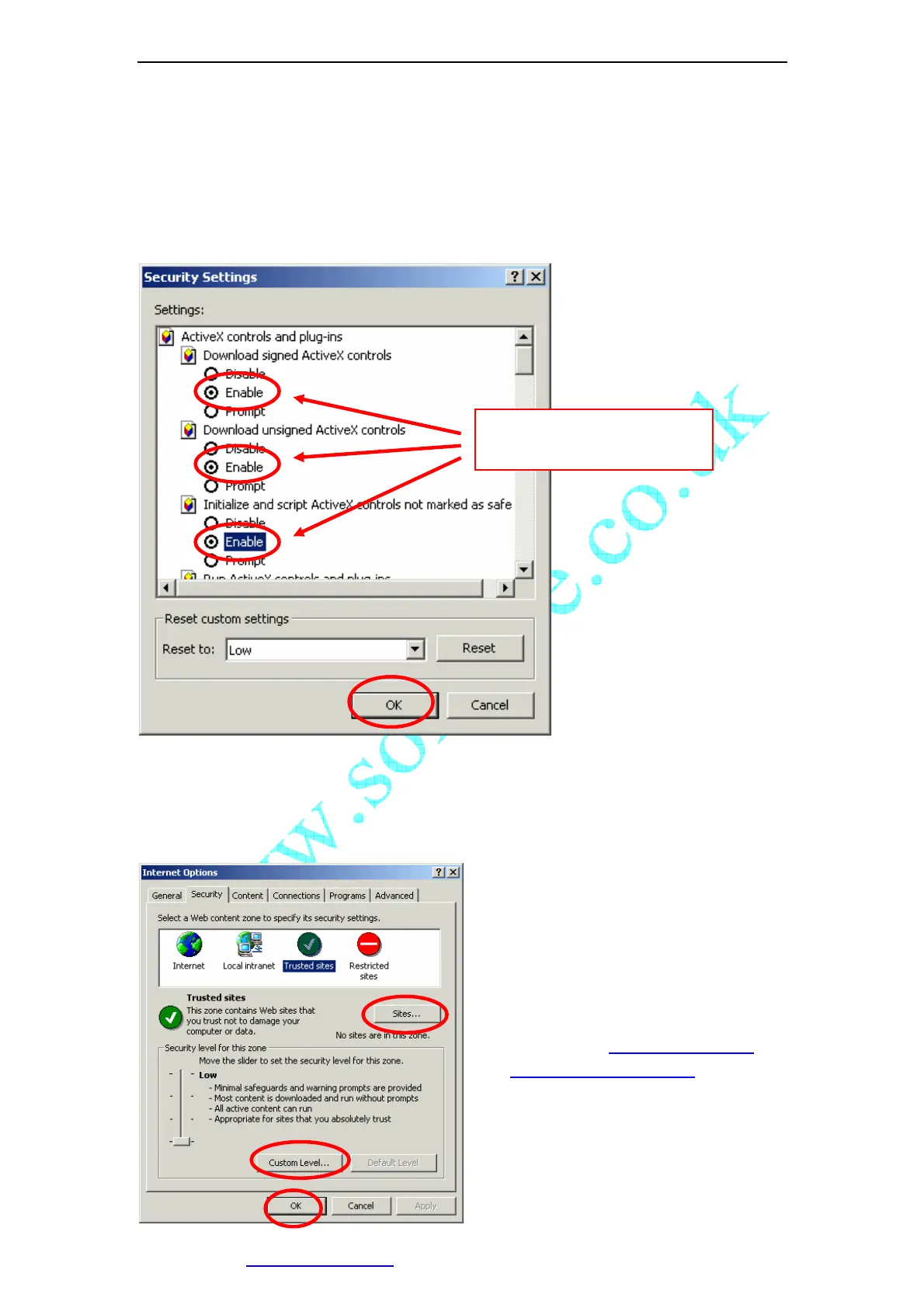
2. Switch to [Security] option card;
3. Select [Custom Level];
4. Setup as the following:
a) Init and Run unmarked as safety ActiveX controls: Select [Alert];
b) downloading unsigned ActiveX controls: Select [Alert];
c) Run ActiveX controls and plug-in: Select [Enable];
Figure 20 Security setting for ActiveX Controls
5. Click [OK] to save.
You can also set IP Camera’s IP address or URL as the “Trusted Sites”. Please see the
following:
1. Select [Internet Options] in [Tools]
menu of IE;
2. Switch to [Security] option card;
3. Select [Trusted Sites];
4. Uncheck
“√“ before
“……https:(S) ”;
5. Input IP Camera’s IP address or URL,
for example, http://192.168.0.250
or
http://C1060-id.vipcam.cn
;
6. Click [Add], [OK] to save.
enable the items related
to ActiveX control.



 To Next Page