4
EN
Copyright © 2006-2017 SOMFY ACTIVITES SA, Société Anonyme. All rights reserved. Images are not contractually binding.
2.3. COMMISSIONING
TheseinstructionsdescribecommissioningusingalocalSomfyio-homecontrol
®
control
point.
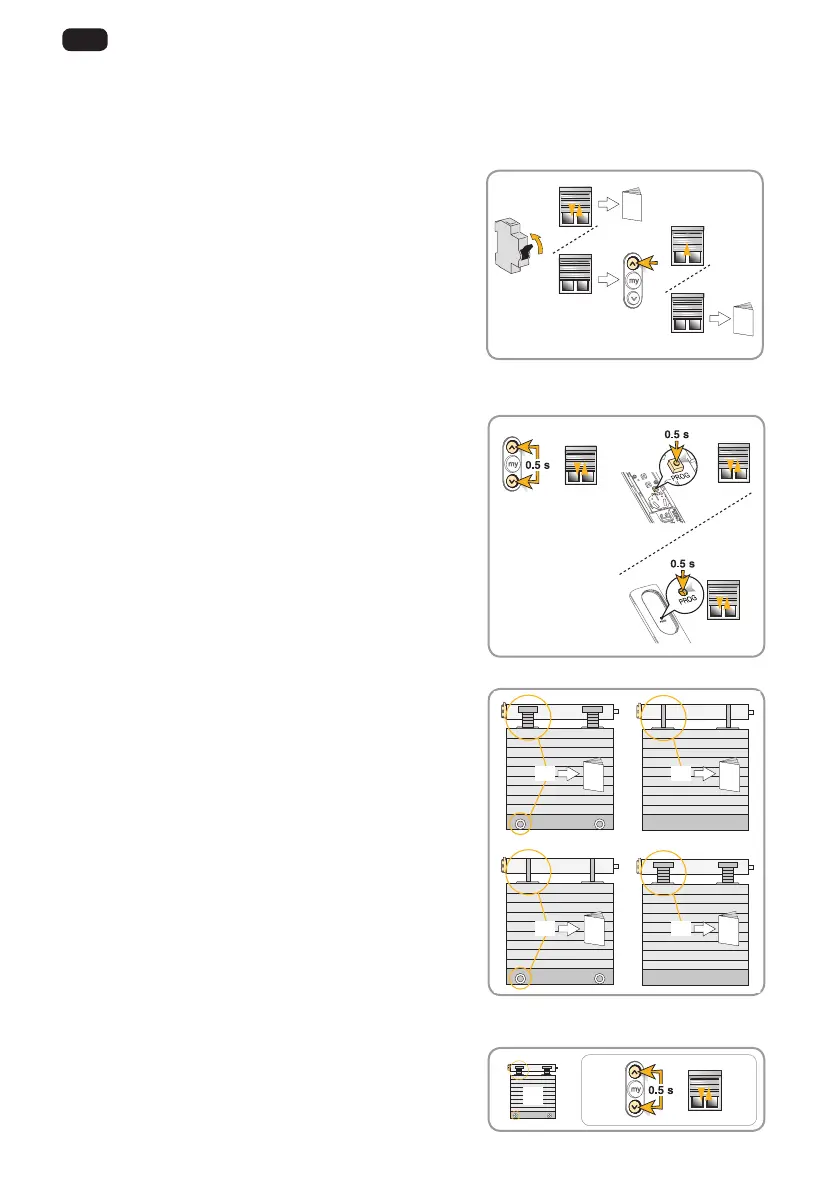
2.3.1. Identifying the type of roller blind setting
Connect the motor to the mains; only switch on one
motor at a time.
• Iftheblindmovesbriey,theendlimitsareset,
and the local control is not programmed, see
2.3.2.
• If the blind does not move, press the up button;
if the blind is raised fully, the end limits are set
and the local control is programmed. Move onto
the next blind.
- If the blind does move, the end limits are not
set and the local control is not programmed, see
2.3.3.
2.3.2. Memorising the transmitter
- Simultaneously press the Up and Down buttons
on the transmitter to be programmed: the blind
movesbriey.
- Brieypressthe“PROG” button on the transmitter
to be programmed: the blind moves briey; the
transmitter is memorised.
2.3.3. Determining the blind types
• [1] Stops and rigid links: see 2.3.4. Adjusting
the automatic upper and lower end limits.
• [2] Flexible links and no stops: see 2.3.5.
Adjusting the manual upper and lower end
limits.
• [3] Flexible links and stops: see 2.3.6. Adjusting
the manual lower and automatic upper end
limits.
• [4] Rigid links and no stops: see 2.3.6. Adjusting
the manual upper and automatic lower end
limits.
2.3.4. Adjusting the automatic upper and lower end limits
1) Simultaneously press the Up and Down buttons:
theblindmovesbriey.
2.3.2.
2.3.3.
[1]
[3] [4]
[2]
2.3.4. 2.3.5.
2.3.6. 2.3.7.
1)
[1]




 To Next Page