EasyManua.ls Logo

SonicWALL NSA 240 - SonicWALL NSA 240 Rear Panel

SonicWALL NSA 240
90 pages
Print Icon
To Next Page IconTo Next Page
To Previous Page IconTo Previous Page
Loading...
SonicWALL NSA 240 Getting Started Guide Page iii
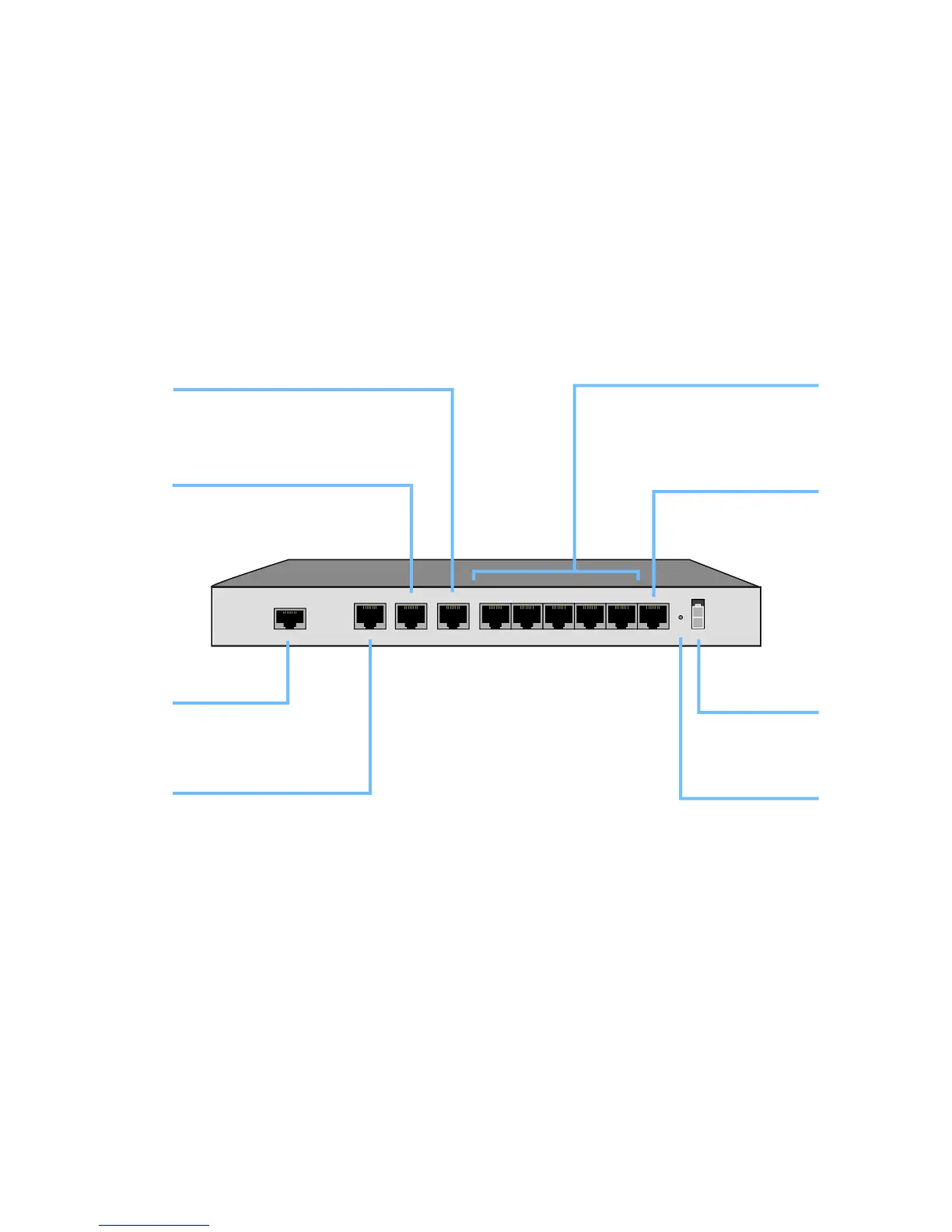
SonicWALL NSA 240 Rear Panel
Console
WAN
X3X0 X1 X2 X4 X5 X6 X7
Power
LAN
X8
Console Port
Provides access to the
SonicOS Command Line
Interface (CLI) via the
DB9 -> RJ45 cable
LAN Port (X0)
Provides dedicated LAN
access to local area
network resources
WAN Port (X1)
Provides dedicated WAN (Internet)
Ethernet Port (X2)
Provides an additional
Gigabit-capable Ethernet
port for general use
Power Supply
Provides power
connection using
supplied power cable
Reset Button
Press and hold to
manually reset the
appliance to “safe mode”
Ethernet Ports (X3-X7)
Provides configurable
10/100 Ethernet ports for
connection to network
devices on WAN, LAN, DMZ,
and other zone types
HA Ethernet Port (X8)
Provides 10/100 Ethernet
port for high availability (HA)
connectivity

Related product manuals