34 35
Phone calls with a mobile phone
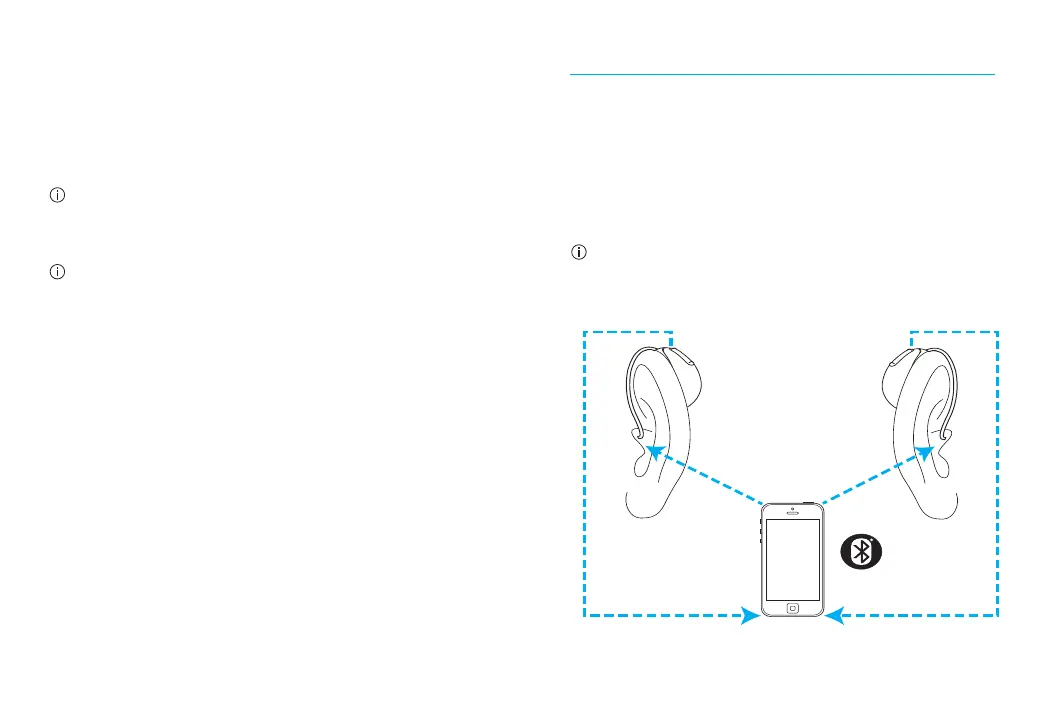
Your hearing aids allow direct communication
with Bluetooth enabled phones. When paired
and connected to a phone, you will hear the
caller’s voice directly in your hearing aids. Your
hearing aids pick up your voice through their
own microphones.
You do not need to hold your mobile phone close
to your mouth, your voice is transmitted through
the hearing aids to your mobile phone.
Caller’s voice
Your voice
Connecting to your mobile phone
Aer your hearing aids have been paired to your
phone, they will automatically connect again
when your phone and hearing aids are turned
on and in range. This can take up to 2 minutes.
The connection will be maintained as long as
the phone remains on and within a range of
up to 10 m (30 ).
To switch a call between your hearing aids and
the speaker on your mobile phone, select the
audio source you would like from your phone.
If you are not sure how to do this, consult the
instruction manual that came with your mobile
phone.




 To Next Page