36 37
Ending a phone call
End a call by holding down the upper or lower
part of the button on either hearing aid for more
than 2 seconds. Alternatively, end the call on
your phone as you normally would.
Rejecting a phone call
An incoming call can be rejected by holding
down the upper or lower part of the button
on either hearing aid for more than 2 seconds.
Alternatively, reject the call on your phone as
you normally would.
long push
> 2 sec
Using your mobile phone with your
hearing aids
Making a phone call
Start a call on your paired mobile phone as you
normally would. You will hear the audio through
your hearing aids. Your hearing aids pick up your
voice through their own microphones.
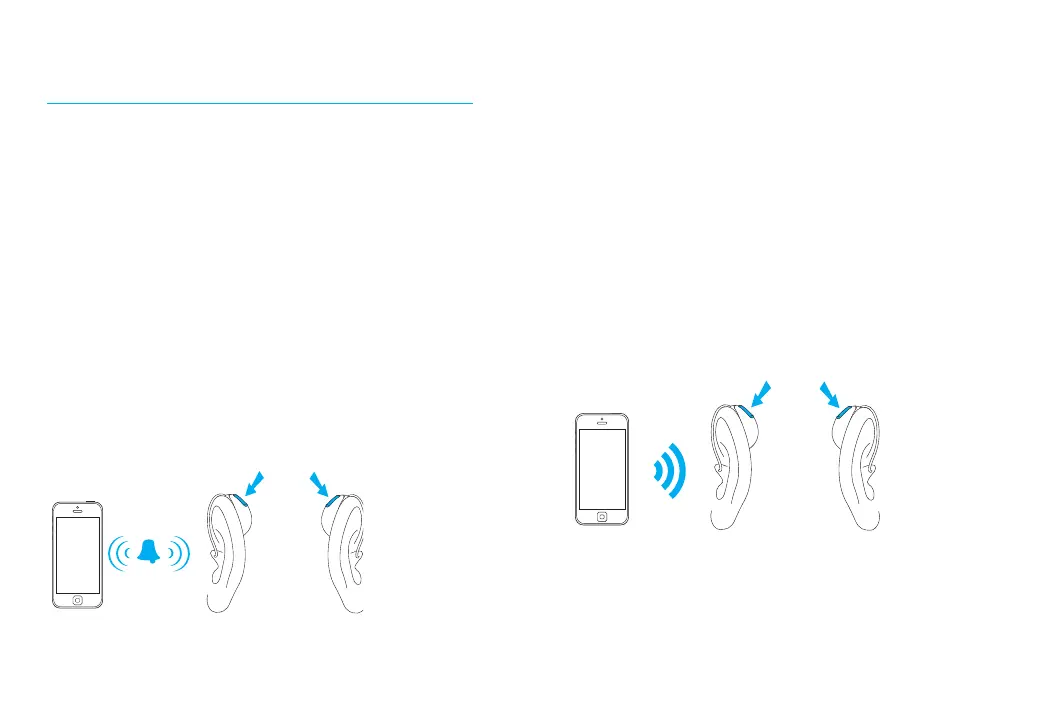
Accepting a mobile phone call
When receiving a call, an incoming call
notication will be heard in the hearing aids.
The call can be accepted by a short push of less
than 2 seconds on either the upper or lower part
of the button on either hearing aid. Alternatively,
accept the call on your phone as you normally
would.
short push
< 2 sec




 To Next Page