Help Guide
Interchangeable Lens Digital Camera
ILCE-7RM3A α7RIII
List of default setting values
The following are the default setting values.
To reset settings to the default values
Select MENU →
(Setup) → [Setting Reset] → [Camera Settings Reset] or [Initialize] → [Enter].
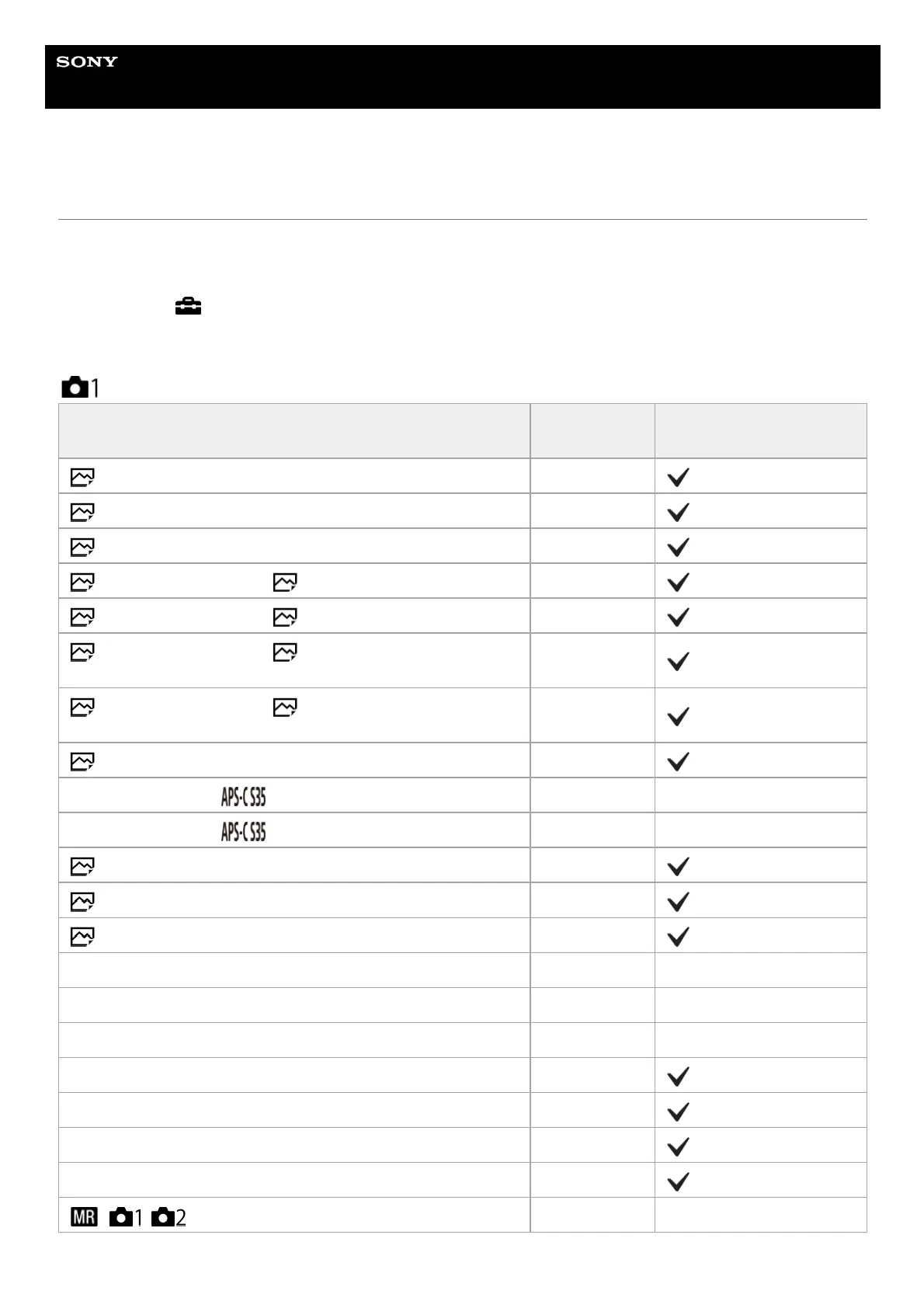
The items that can be reset using [Camera Settings Reset] are limited. See the following tables. If you select [Initialize],
all the settings of the camera will be reset to the default values.
Camera Settings1
MENU items
Default setting
value
Resettable using [Camera
Settings Reset]
File Format JPEG
RAW File Type Compressed
JPEG Quality Fine
JPEG Image Size (when [ Aspect Ratio] is set to [3:2]) L: 42M
JPEG Image Size (when [ Aspect Ratio] is set to [16:9]) L: 36M
JPEG Image Size (when [ Aspect Ratio] is set to [3:2]
recording in the APS-C-equivalent size)
L: 18M
JPEG Image Size (when [ Aspect Ratio] is set to [16:9]
recording in the APS-C-equivalent size)
L: 15M
Aspect Ratio 3:2
APS-C/Super 35mm ( Shooting) Auto ―
APS-C/Super 35mm (
Shoot.: Manual) Off ―
Long Exposure NR On
High ISO NR Normal
Color Space sRGB
Lens Comp. (Shading Comp.) Auto ―
Lens Comp. (Chro. Aber. Comp.) Auto ―
Lens Comp. (Distortion Comp.) Off ―
Drive Mode Single Shooting
Bracket Settings (Selftimer during Brkt) Off
Bracket Settings (Bracket order) 0→-→+
Px. Shift Multi Shoot. Off
/ Recall ― ―


 To Next Page