3:_g _lormal ratio.
An HDTV ratio.
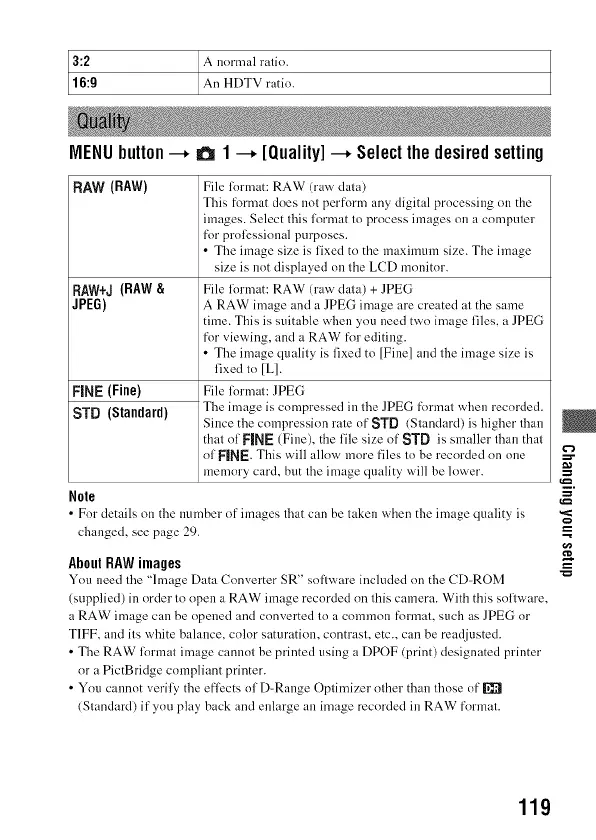
MENUbutton--, a 1--, [Quality]--, Selectthedesiredsetting
RAW (RAW) File li)rmat: RAW (raw data)
This format does not perfi_rm any digital processing on the
images. Select this format to process images on a computer
for proli_ssional purposes.
• The image size is fixed to the maximum size. The image
size is not displayed on the LCD monitor.
RAW+J (RAW & File li)rmat: RAW (raw data) + JPEG
JPEG) A RAW image and a JPEG image are created at the same
time. This is suitable when you need two image files, a JPEG
for viewing, and a RAW for editing.
• The image quality is fixed to [Fine] and tile image size is
fixed to [L].
FiNE (Fine) File IZ_rmat:JPEG
STD (Standard) The image is compressed in tile JPEG format when recorded.
Since the compression rate of STD (Standard) is higher than
that of FINE (Fine), the file size of STD is smaller than that
of FINE. This will allow more files to be recorded on one
memory card, but tile image quality will be lower.
Note
• For details on the numher of ilruJges that c'_mhe taken when the image quMity is
changed, see page 29.
About RAW images
You need tile "lm_ge Data Converter SR" soflw_re included on the ('D-ROM
(supplied) in order to open a RAW image recorded on this camera. With this soflware,
a RAW image can be opened and converted to a common [i_rmat, such as JPEG or
TIFF, and its white balance, color saturation, contrast, etc., can be readjusted.
• The RAW li)rmat image cannot be printed using a DPOF (print) designated printer
or a PictBridge compliant printer.
• You cannot verif> the eflL'cts of D-Range Optimizer other than those of
(Standard) if you play back and enlarge an image recorded in RAW format.
?
=
119



 To Next Page