Settingimagesizeandimagequality
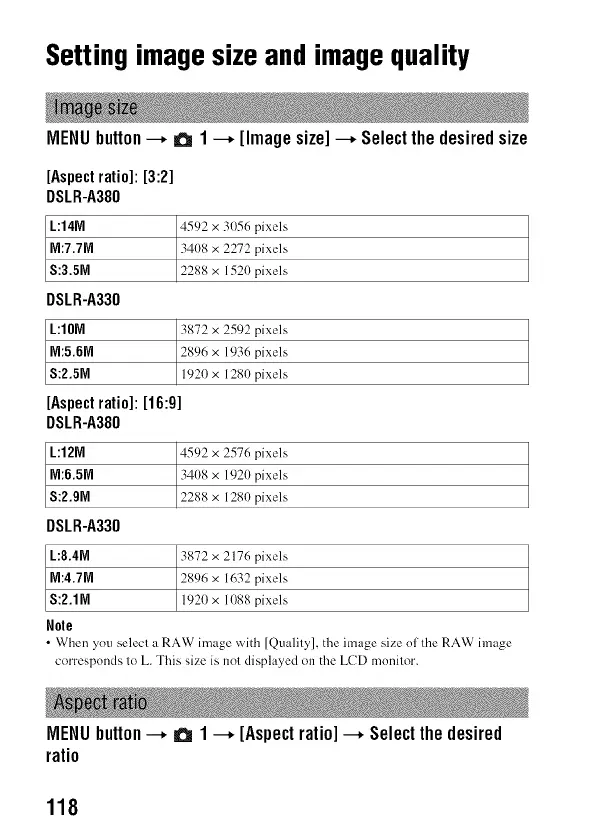
MENUbutton--, a 1--, [Imagesize]--, Selectthedesiredsize
[Aspectratio]: [3:2]
DSLR-A380
L:14N
M:7.7M
S:3.5M
DSLR-A330
L:IOM
M:5.6M
S:2.5M
[Aspectratio]: [16:9]
DSLR-A380
L:12M
M:6.5M
S:2.9M
DSLR-A330
L:8.4M
M:4.7M
S:2.1M
Nole
4592 x 3056 pixels
3408 x 2272 pixels
2288 x 1520 pixels
3872 x 2592 pixels
2896 x 1936 pixels
1920 x 1280 pixels
4592 x 2576 pixels
34(t8 x 1920 pixels
2288 x 1280 pixels
3872 x 2176 pixels
2896 x 1632 pixels
1920 x 1088 pixels
• When you select a RAW image with [Quality], the image size of the RAW image
corresponds to L. This size is not displayed oi1 the LCD monitor.
MENUbutton--, a 1--, [Aspectratio]--, Selectthedesired
ratio
118



 To Next Page