Checkingthe numberof recordable
images
Once you insert a memory card into the
camera and set the power switch to ON,
the number of images that call be
recorded (should you continue to shoot
using the current settings) is displayed on
the LCD monitor,
Notes
• When "0" (the nmnber of recordable images) flashes in yellow, the memory card is
t'ull. Replace the memory card with another one, or delete images in the current
memory card (page 112).
• When "NO CAR[)" (the nmnber or" recordable images) flashes in yellow, it means
no memory cm'd has been inserted, lnsert a memory card.
g
CD
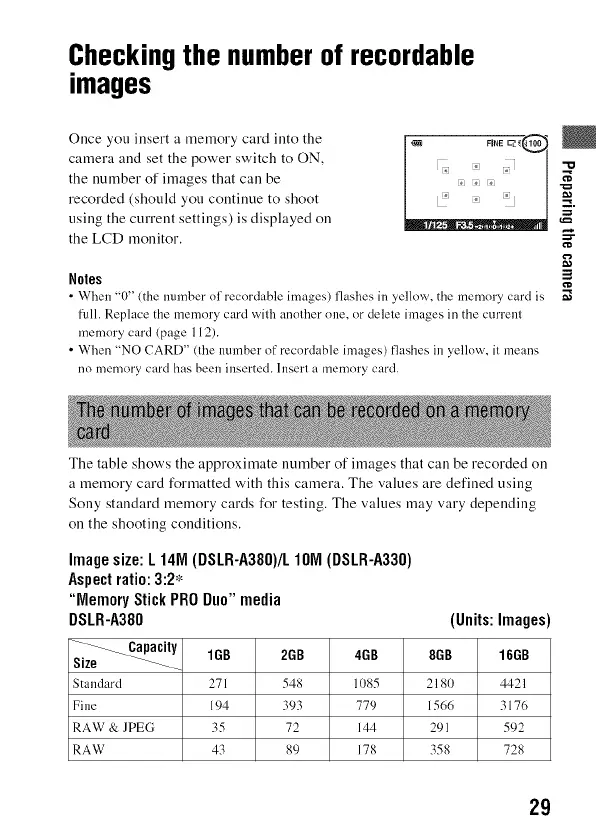
The table shows the approximate number of images that can be recorded on
a memory card formatted with this camera. The values are defined using
Sony standard memory cards for testing. The values may vary depending
on the shooting conditions.
Image size: L 141VI(DSLR-A380)/L IOIVI (DSLR-A330)
Aspect ratio: 3:2*
"Memory Stick PRO Duo" media
DSLR-A380 (Units: Images)
1GB 2GB 4GB 8GB 16GB
Standard 271 548 11)85 2181) 4421
Fine 194 393 779 1566 3176
RAW & ]PEG 35 72 144 291 592
RAW 43 89 178 358 728
29



 To Next Page