Home
Sony
Digital Camera
alpha 330
Page 44 (Adjusting the LCD Monitor Angle)
Sony alpha 330 - Adjusting the LCD Monitor Angle; Shooting Images; Camera Operation and Stability
171 pages
Manual
Save Page as PDF
To Next Page
To Next Page
To Previous Page
To Previous Page
Loading...
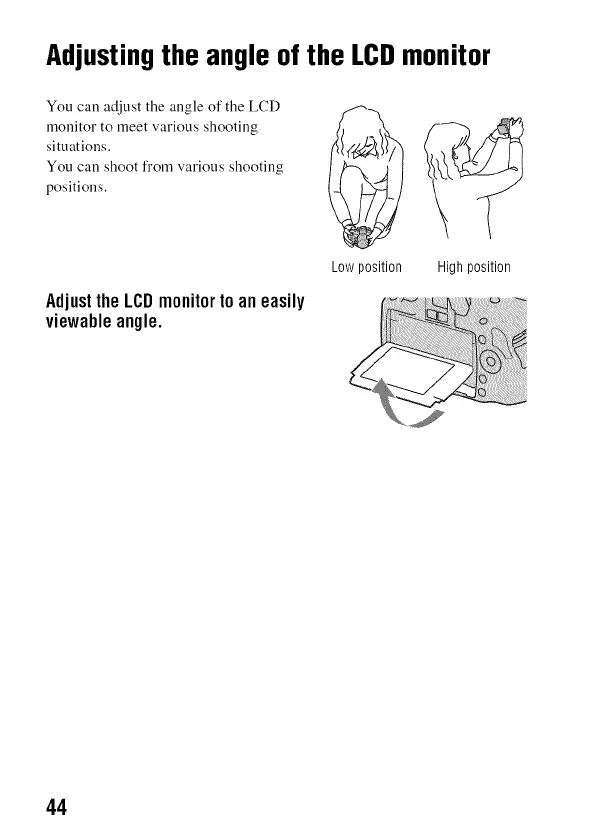
Adjusting
the
angle
of
the
LCD
monitor
You
can
adjust
the
angle
of
the
LCD
monitor
to
meet
various
shooting
situations.
You
can
shoot
from
various
shooting
positions.
Adjust
the
LCD
monitor
to
an
easily
viewable
angle.
Low
position
High
position
44
43
45
Table of Contents
Main Page
Table of Contents
11
Selectingthe Drivemode
99
Shooting Single Shot
99
Playingback Images
104
Protectingimages(Protect)
111
Deletingimages(Delete)
112
Viewingimagesona TV Screen
114
Settingimagesize and Imagequality
118
Settingthe Methodfor Recordingona Memorycard
120
Changing the Noisereductionsetting
122
Changing the Flmctions of the Control Dial
123
Changing Othersettings
124
Setting the Lcdmonitor
126
Confirming the Versionof the Camera
128
Resetting to the Default
129
Copyingimagesto Yourcomputer
131
Viewingimagesonyourcomputer
135
Usingthe Software
139
Specifying DPOF
145
Printing Images by Connecting the Cmnera to a Pictbridge Compliant Printer
147
Related product manuals
Sony alpha 300
8 pages
Sony alpha 3000
4 pages
Sony alpha ILCE-3000
195 pages
Sony Alpha 9
108 pages
Sony Alpha 1
96 pages
Sony Alpha A7
455 pages
Sony Alpha 7C
2 pages
Sony Alpha 7s
96 pages
Sony alpha 200
6 pages
Sony Alpha 7 II
103 pages
Sony Alpha 7 IV
179 pages
Sony Alpha 6400
6 pages



 To Next Page