Shootingwiththe automatic
setting
The "AUTO" mode allows you to easily shoot ally subject under ally
conditions because the camera makes appropriate judgments on the
situation to adjust the settings.
Select (_) when shooting ill a location where the use of a flash is restricted.
When you turn the mode dial, the explanation of the selected mode and
methods of shooting are displayed on the screen (Help Guide disp.). You
call clear the Help Guide (page 124).
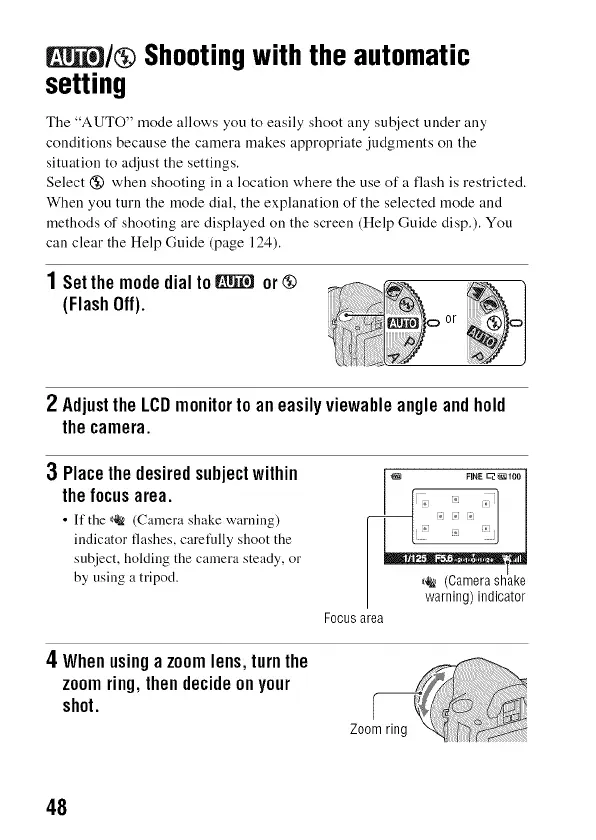
1Setthemodedialto_ or@
(FlashOff).
2 AdjusttheLCDmonitortoaneasilyviewahleangleandhold
thecamera.
3 Placethedesiredsubjectwithin
thefocusarea.
• It'tile _ (Camera shake warning)
indicator flashes, carefidly shoot the
subject, holding the camera steady, or
by using a tripod.
___ FINE _I0O
I warning) indicator
Focus area
4Whenusingazoomlens,turnthe
zoomring,thendecideonyour
shot.
48



 To Next Page