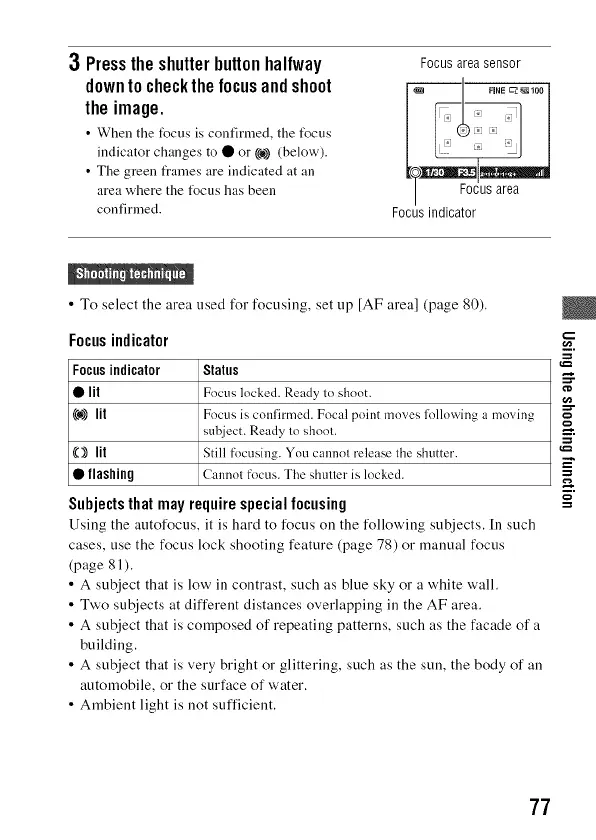
3 Presstheshutterbuttonhalfway
downto checkthefocusandshoot
theimage.
• When the t_cus is confirmed, the t_cus
indicator changes to • or ((o))(below).
• The green t_ames are indicated at an
area where the t_cus has been
confirmed.
Focus areasensor
Focus indicator
• To select the area used for focusing, set up [AF area] (page 80).
Focus indicator
Subjectsthat may requirespecialfocusing
Using the autofocus, it is hard to focus on the following subjects. [n such
cases, use the focus lock shooting feature (page 78) or manual focus
(page 81 ).
• A subject that is low in contrast, such as blue sky or a white wall.
• Two subjects at different distances overlapping in the AF area.
• A subject that is composed of repeating patterns, such as the facade of a
building.
• A subject that is very bright or glittering, such as the sun, the body of an
automobile, or the surface of water.
• Ambient light is not sufficient.
,_=
Focusindicator Status ____..
• lit Focus locked. Ready to shoot.
(@))lit Focus is conlirmed. Focal point moves lk)llowing a moving
sul!iect. Ready 1o shool.
(O) lit Still focusing. You cannol release lhe shutter.
• flashing Cannol focus. The shuner is locked.
77



 To Next Page