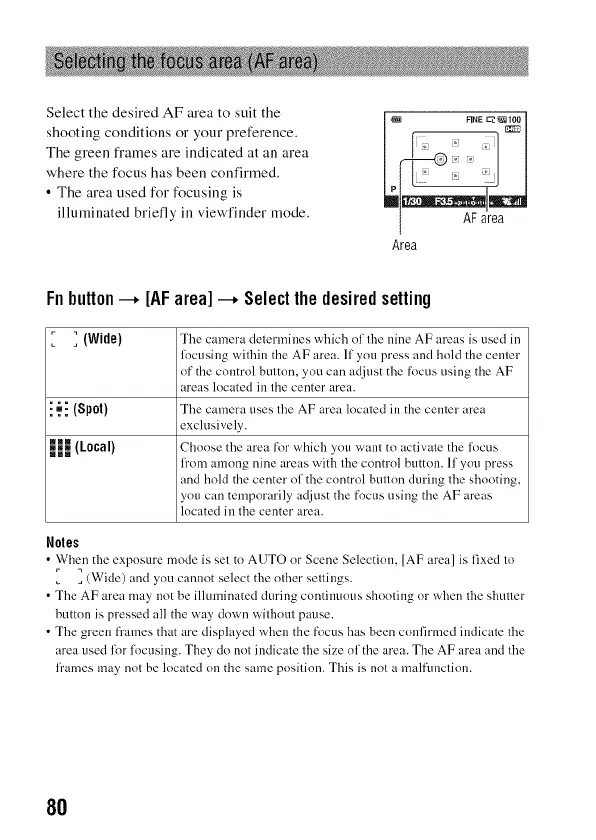
Select the desired AF area to suit the
shooting conditions or your preference.
The green frames are indicated at all area
where the focus has been confirmed.
• The area used for focusing is
illuminated briefly ill view'finder mode.
FINE _100
Area
Fnbutton--* [AFarea]--* Selectthe desiredsetting
r _ (Wide) The camera determines which nl the nine AF areas is used in
locusing within the AF area. If you press and hold the center
of the control button, you can adjust the focus using the AF
areas located in the center area.
i ._i (Spot) Tire camera uses tire AF area located in the center area
exclusively.
HJ (Local) Cl ........ the tlrea fnr vqhich } ....... ant to activzfle the l( ......
fi'om among nine areas with tire contrnl button. If ynt/press
and hold the center nf the control buttnn during tire shooting,
you can temporarily adjust the fncus using the AF areas
located in tire center area.
Notes
• When the expnsure mode is set to AUTO or Scene Selection, [AF area] is fixed to
] (Wide) and you cannot select the nlher settings.
• Tire AF area may not be illuminated during cnntilmnus shonling or when Ihe shuner
buttnn is pressed all the way down withnut pause.
• Tire green [?'ames that are displayed when the focus has been confirmed indicate tire
area used lor focusing. They do not indicate tire size nf the area. The AF area and tire
fi'ames may not be located nu the same position. This is not a malfunction.
8O



 To Next Page