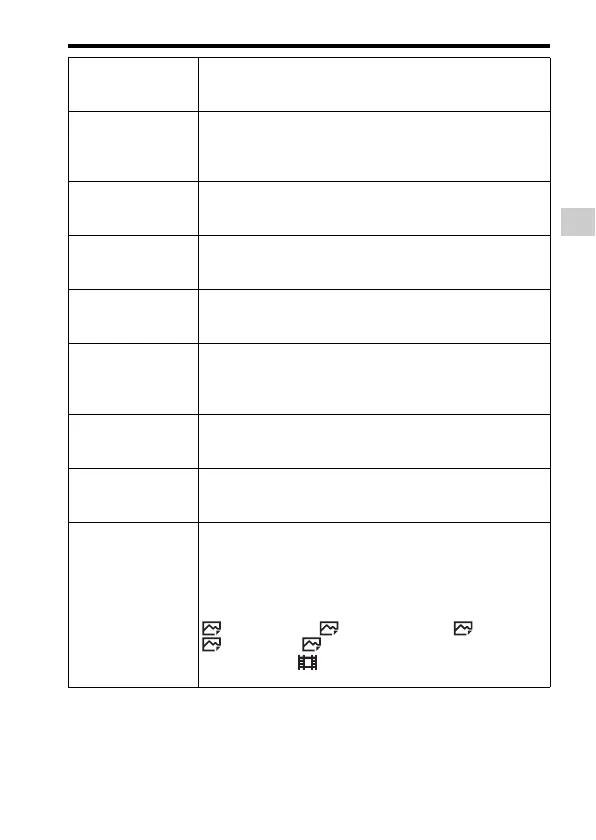
Functions that can be selected using the MENU button
Functions list
GB
39
Exp.comp.set Sets whether to reflect exposure compensation value to flash
compensation.
(Ambient&flash/Ambient only)
Reset EV Comp. Sets whether to retain the exposure value set without using
the exposure dial, or reset the exposure value to 0 when you
turn off the camera.
(Maintain/Reset)
Bracket order Sets order of shooting for exposure bracket and white balance
bracket.
(0 t – t +/– t 0 t +)
Face Registration Registers or changes the person to be given priority in the
focus.
(New Registration/Order Exchanging/Delete/Delete All)
APS-C Size Capture Sets whether or not to record with an APS-C size-equivalent
area.
(On/Auto/Off)
AF Micro Adj. Allows you to make fine adjustments to the position of the
focus when an LA-EA2/LA-EA4 Mount Adaptor (sold
separately) is attached.
(AF Adjustment Set./amount/Clear)
Lens Comp. Compensates for distortion on the screen caused by the lens
attached.
(Shading Comp./Chro. Aber. Comp./Distortion Comp.)
Video Light Mode Sets the illumination setting for the video light (sold
separately).
(Power Link/REC Link/REC Link&STBY/Auto)
Function Menu Set. Customizes the functions displayed when the Fn (Function)
button is pressed.
(Drive Mode/Flash Mode/Flash Comp./Focus Mode/Focus
Area/Exposure Comp./ISO/Metering Mode/White Balance/
DRO/Auto HDR/Creative Style/Shoot Mode/Picture Effect/
Picture Profile/Center Lock-on AF/Smile/Face Detect./
Soft Skin Effect/ Auto Obj. Framing/ Image Size/
Aspect Ratio/ Quality/SteadyShot/Audio Rec Level/
Zebra/Grid Line/ Marker Display/Audio Level Display/
Peaking Level/Peaking Color/Not set)



 To Next Page