15
Hookups and Settings
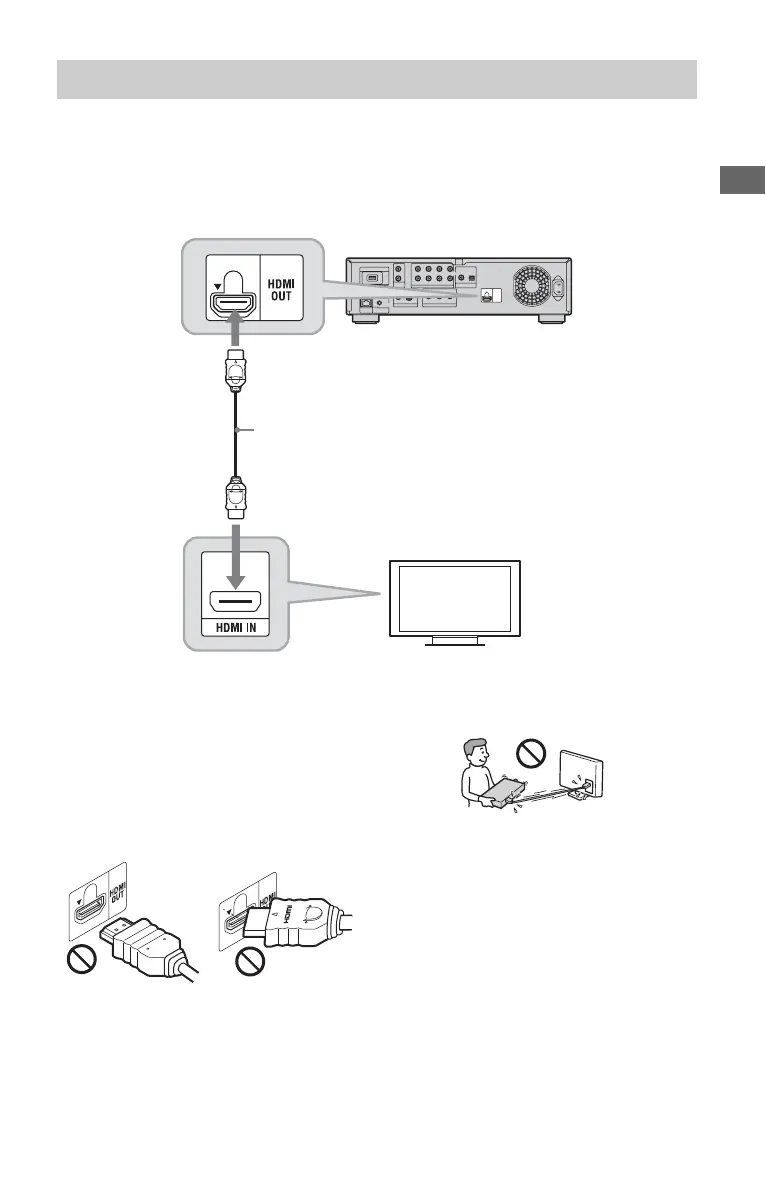
Connect the player and your TV using an HDMI cable to enjoy high quality digital pictures and
sound through the HDMI OUT jack.
If you connect a Sony TV that is compatible with the “Control for HDMI” function (page 16),
refer to the operating instructions supplied with the TV.
If you connect a 1080/24p- or 1080p-compatible TV, use a High Speed HDMI cable.
Notes on connecting to the HDMI OUT jack
Observe the following as improper handling
may damage the HDMI OUT jack and the
connector.
• Carefully align the HDMI OUT jack on the
rear of the player and the HDMI connector
by checking their shapes. Make sure the
connector is not upside down or tilted.
• Be sure to disconnect the HDMI cable when
moving the player.
• If you place the player on a cabinet with the
HDMI cable connected, do not apply too
much pressure to the cabinet wall. It may
damage the HDMI OUT jack or the HDMI
cable.
• When connecting or disconnecting, do not
screw in or rotate the HDMI connector.
About indicators for HDMI connection
When connecting an HDMI compatible
component, the HDMI indicator lights up in
the front panel display.
Connecting to an HDMI jack
TV
Blu-ray Disc/DVD player
HDMI cable (not supplied)
,continued













 To Next Page